Introduction
Your WordPress website is sitting there, running quietly in the background, and there are probably a dozen plugin update notifications waiting in your dashboard right now. You've been meaning to get to them. But the site is loading fine, nothing seems broken, so what's the rush?
Here's the thing: outdated WordPress plugins are the single most common entry point for hackers targeting small business websites. The issue isn't always obvious until something goes seriously wrong - and by then, the damage can range from a Google blacklist to a full customer data breach.
This guide explains exactly what happens when you don't update your WordPress plugins, why the consequences go well beyond security, and what you should be doing right now to protect your site.
Why WordPress Plugins Need to Be Kept Updated
WordPress plugins are pieces of software written by third-party developers. Like any software, they contain code - and code has bugs, security flaws, and compatibility issues that developers address over time through updates. When a developer discovers a vulnerability (or when an external security researcher reports one), they release a patch. That patch only protects you if you install it.
Once a vulnerability is publicly disclosed, it can take automated scanners a matter of hours to start identifying websites still running the affected version. Security researchers and hackers both monitor databases like the WordPress Vulnerability Database and CVE (Common Vulnerabilities and Exposures) records. When a plugin with a large install base has a known flaw, thousands of sites become targets almost immediately.
According to WordPress security firm Wordfence, outdated plugins and themes consistently account for the majority of compromised WordPress sites - significantly more than weak passwords or poor hosting. The reason is simple: millions of sites run the same popular plugins, making automated attacks cheap and efficient to carry out at scale.
The Security Risks of Not Updating Your WordPress Plugins
When you leave your WordPress plugins outdated, you are not taking a small or theoretical risk. You are leaving a known, publicly documented door unlocked in a building that automated bots are testing around the clock.
How Hackers Exploit Outdated Plugin Vulnerabilities
Attackers do not typically target your business specifically. They use automated tools that scan thousands of sites simultaneously, checking which version of which plugins each site is running and cross-referencing that against known exploit lists. When a match is found, the attack begins without any human involvement on their end.
Once inside, what they do depends on their goal. Some attackers inject malicious code that redirects your visitors to phishing sites or installs malware on their devices. Others steal customer data - names, email addresses, payment information - and use or sell it. Some install a "backdoor" that lets them quietly return even after you've cleaned the visible infection. Others use your hosting server to send spam emails, which can get your domain blacklisted with email providers.
What a Hacked WordPress Site Actually Looks Like
This is where many business owners get caught out. The most sophisticated WordPress attacks are designed to be invisible to the site owner. Redirects may only trigger for visitors arriving from Google search. Malicious scripts may only activate when your own IP address isn't detected. Your site can look completely normal to you while actively serving malware to your customers.
You might only find out when Google Search Console sends a warning email, your hosting provider suspends the account, a customer contacts you to say their browser flagged the site as dangerous, or your email domain gets blacklisted. Other attacks are far more visible: homepage defacement, all content deleted, or the site going entirely offline. These tend to happen fast once an active exploit is in circulation.
Need Someone to Keep Your WordPress Site Updated?
Professional website maintenance for Irish SMEs. Plugin updates, security monitoring, and backups - all handled for you.
How Outdated Plugins Damage Your Site Speed and Google Rankings
Security gets most of the attention in these conversations, and rightly so. But outdated WordPress plugins also cause measurable damage to your site's performance and Google rankings - and most Irish business owners don't realise the two are connected.
Plugin updates frequently include performance improvements, optimised database queries, and reduced server memory usage. A plugin that was lean and efficient two years ago may have accumulated technical debt that slows your page load times. Google has made site speed a direct ranking factor, and Core Web Vitals - the metrics that measure how fast and stable your pages feel to real users - are directly influenced by how well your plugins are running.
Outdated plugins also cause compatibility problems. WordPress releases new core versions on a regular schedule, and other plugins and themes update alongside it. When one plugin is left behind, it can generate PHP warnings, cause visual glitches in your layout, or break functionality entirely. A broken contact form, a checkout that silently fails, navigation that stops rendering on mobile - these are not just frustrating for users. Google's crawler spots them too, and they affect how your site is understood and ranked.
If you run a WooCommerce store, the stakes are even higher. Outdated WooCommerce extensions - payment gateways, shipping calculators, booking systems, loyalty programmes - can fail without any visible error message. You may be losing orders and have no idea why.
The GDPR Risk That Most Irish Business Owners Overlook
Under Ireland's Data Protection Act 2018 and the EU's GDPR, any business that collects personal data - through a contact form, a newsletter sign-up, a booking system, or an online shop - has a legal obligation to keep that data secure. Running a website with known, unpatched security vulnerabilities is a failure of that obligation, regardless of whether a breach actually occurs.
If your site is compromised through an outdated plugin and customer data is exposed, you may be legally required to report the breach to the Data Protection Commission within 72 hours of becoming aware of it. Depending on the nature and scale of the breach, financial penalties and reputational damage both follow.
Small business websites are targeted precisely because they tend to have fewer technical safeguards than larger organisations. A contact form plugin, a CRM integration, or an e-commerce checkout extension running on an old version with a known vulnerability is all an attacker needs to access the data your customers trusted you to protect. For more on keeping a WordPress site secure from the ground up, our post on securing online transactions with WordPress covers the full picture for business sites.
Updated vs. Outdated Plugins: What's Actually at Risk
| Risk Area | Updated Plugins | Outdated Plugins |
|---|---|---|
| Security vulnerabilities | Patched and mitigated | Open and actively targeted by automated scanners |
| Site performance | Optimised with each release | May include inefficient code and slow database queries |
| PHP compatibility | Compatible with current PHP versions | Risk of fatal errors when hosting upgrades PHP |
| WordPress core compatibility | Tested against current core version | Can cause white screens, broken layouts, or crashes |
| GDPR and data security | Up-to-date data handling practices | Potential legal liability if customer data is exposed |
| Google rankings and SEO | No security or performance penalty risk | Risk of Google blacklisting or ranking drops from slow speeds |
| WooCommerce and booking tools | Reliable, tested integrations | Silent failures, broken checkout, lost bookings |
A Practical Guide to WordPress Plugin Maintenance
The short answer on how often to update: check at least once a week. Security patches should be applied as soon as they are available - there is no good reason to delay them. Most plugin updates take under a minute to apply, and the risk of leaving them uninstalled always outweighs the minor inconvenience of applying them.
That said, there is a right way to do this. Always take a full site backup before running updates. Most hosting providers include backup tools in their dashboard, and plugins like UpdraftPlus let you trigger a backup in about two minutes. This protects you in the uncommon but real case where an update causes a conflict with another plugin or breaks something in your theme.
For major plugins - WooCommerce, Elementor, Yoast SEO, Gravity Forms - update them one at a time and check the front end of your site briefly after each one. Minor utility plugins can usually be updated in bulk without any issue.
A realistic maintenance rhythm for an Irish business owner managing their own WordPress site looks something like this:
- Weekly: Log into your WordPress dashboard, check for pending plugin, theme, and core updates, back up the site, and apply the updates
- Monthly: Review all installed plugins and delete any you are not actively using - deactivated plugins still carry security risk
- Quarterly: Check that all installed plugins are still actively maintained by their developers. Any plugin that hasn't received an update in over twelve months is a potential liability
If you're running a busy site and this genuinely does not get prioritised, a professional website maintenance service handles all of this for you. For most small Irish businesses, the monthly cost of maintenance is a fraction of what emergency recovery from a breach costs in time, professional fees, and lost business.
When Ignoring Updates Goes Wrong: A Real-World Scenario
Fictional Case Example: Harbour View Stays, a small guesthouse in Galway, ran a WordPress website with an online booking plugin they hadn't updated in fourteen months. One afternoon, the owner noticed that the booking form was redirecting visitors to an unfamiliar website. An investigation found that a known vulnerability in the booking plugin - one patched by the developer eight months earlier - had allowed an attacker to inject malicious redirect code into the site. By the time it was discovered, Google had already flagged the domain in Search Console. Organic traffic dropped sharply as browser security warnings deterred prospective guests. The cleanup took three days and several hundred euro in professional remediation work, and the site took weeks to recover its Google rankings. The plugin update that would have prevented it would have taken thirty seconds to apply.
Worried Your WordPress Site Might Be at Risk?
We review your WordPress plugins, security settings, and overall site health. Free consultation for Irish business owners.
Common Mistakes Irish Business Owners Make with WordPress Plugin Maintenance
Ignoring the Update Notification Entirely
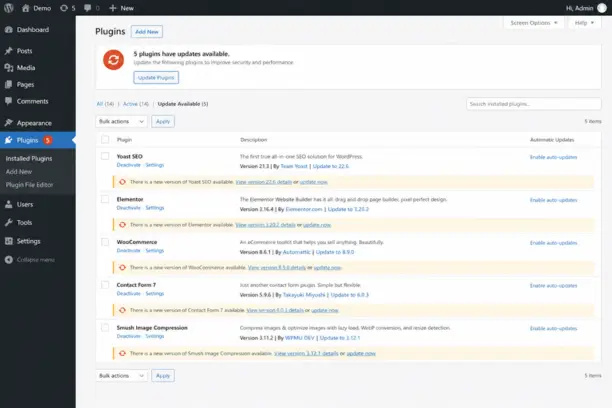
The orange notification bubble on your plugins menu is not a decoration. Many business owners dismiss it because they're busy, they're worried an update might break something, or they simply don't understand what it means. That notification is as much a security alert as it is a feature update. An ignored security patch on a popular plugin is an open invitation to automated exploit tools that check millions of sites every day.
Updating Without a Backup in Place
The opposite problem is applying updates carelessly, without a current backup. Plugin conflicts do happen, particularly when multiple plugins are updated at once on a site with heavy customisation. Running a full backup before any update takes two minutes and removes all the risk. Never update WooCommerce, Elementor, or any page builder plugin without a fresh backup ready to restore if something breaks.
Leaving Deactivated Plugins Installed
A deactivated plugin still exists in your site's file system and can still be exploited if it contains a known vulnerability. Many business owners deactivate old plugins but leave them installed "just in case." There is no benefit to this, and real risk in doing it. If you are not using a plugin, delete it. The WordPress dashboard makes this a ten-second task.
Assuming the Site Looks Fine So Everything Must Be Fine
This is the most dangerous assumption. The most effective WordPress attacks are deliberately invisible to the site owner. Redirects may only activate for traffic coming from search engines, not for direct visitors. Malicious code may only run when your own IP address is absent. Just because your site appears normal to you does not mean it hasn't been compromised. Install a security plugin like Wordfence, or run occasional scans using Sucuri's free SiteCheck tool at sitecheck.sucuri.net - it takes thirty seconds and will flag most active infections.
Treating Automatic Updates as a Complete Solution
Enabling WordPress's built-in automatic updates for all plugins can seem like the easy answer, but it comes with its own risks. A plugin update that introduces a conflict can break your site without you realising it for days. If you use automatic updates, pair them with uptime monitoring (tools like UptimeRobot have a free tier) so you are immediately alerted if the site goes down after an automated update runs. Automatic updates reduce risk but they don't eliminate the need for human oversight.
What to Do If Your WordPress Site Has Already Been Compromised
If you suspect your site has been hacked - visitors are being redirected, browser warnings are appearing, your hosting provider has suspended the account, or Google Search Console has flagged malware - act quickly and in the right order.
Put the site into maintenance mode or take it offline immediately to stop visitors being exposed. Then run a full malware scan using Wordfence, Sucuri, or your hosting provider's built-in security tools. If the infection is serious, restore from a clean backup taken before the compromise occurred - this is the fastest and most complete fix available. After restoring, update every single plugin, theme, and WordPress core version immediately. Change all admin passwords. Check your user accounts for any accounts you did not create. Then review your recently modified files for any injected code that the backup might have missed.
If you don't have a clean backup to restore from, professional WordPress cleanup is the next step. This involves locating and removing all injected code, identifying and closing the entry point, and hardening the site against reinfection. It is time-consuming and genuinely expensive compared to the cost of regular maintenance. You can read more about the wider topic of WordPress site security in our guide to why website maintenance is crucial for long-term success.
Keep Your WordPress Site Protected - Before It Becomes a Problem
Keeping your WordPress plugins updated is not a technical task reserved for developers. It takes a few minutes each week and it is one of the most impactful things you can do to protect your business online. The consequences of not doing it - site compromise, data breaches, Google penalties, GDPR exposure - are all preventable.
If you'd rather not manage this yourself, or if you have an existing WordPress site you are not confident about, we are happy to take a look. Get in touch with Web Wizard for a free site health review - we'll check your plugins, security settings, and overall WordPress setup and give you a straight answer on what needs attention.