Introduction
Your WordPress website is losing customers right now. Not because of your pricing, your photography, or your copy - but because it takes too long to load. A slow WordPress site is one of the most common and fixable problems on Irish business websites, and most owners have no idea it is happening.
If your site takes longer than three seconds to load on mobile, more than half of your visitors are already gone before they have read a single line. Google knows this too, which is why page speed is a confirmed ranking factor. A slow site means lower visibility, a higher bounce rate, and fewer enquiries - even if everything else about your website is well designed and well written.
This checklist covers the most impactful fixes you can make to speed up a WordPress website. It is written for business owners, not developers. No jargon without explanation. Work through it in order and you will see measurable improvements.
Why a Slow WordPress Website Is Costing You More Than You Think
To speed up a WordPress website, the five most impactful steps are: install a caching plugin, compress and convert your images, connect a CDN like Cloudflare, remove unused plugins, and minify your CSS and JavaScript files. Done properly, these steps can reduce page load times from five or six seconds down to under two seconds, which is the performance threshold Google recommends for mobile users.
Speed matters because every extra second a page takes to load reduces your conversion rate. A one-second delay can reduce conversions by around seven per cent. For a service business receiving ten enquiries a week through its website, that adds up to a significant number of missed leads over the course of a year - customers who left before they ever saw what you offer.
Beyond conversions, slow sites are increasingly disadvantaged in Google search. Google's Core Web Vitals are a set of real-world performance metrics that now directly influence search rankings. They measure how quickly your page loads, how stable your layout is as it renders, and how quickly it responds to user input. If your WordPress site is failing these metrics, you will find it harder to rank for local searches in Ireland, no matter how good your content is.
The frustrating thing for most business owners is that WordPress sites slow down gradually. They start fast enough, but as you add plugins, upload images, and accumulate years of database revisions, performance erodes. You do not notice it day to day. Your visitors do.
Step One: Test Your WordPress Speed Before You Change Anything
Before making any changes, get a baseline reading of your current speed. Without a starting point, you cannot measure whether the fixes are working.
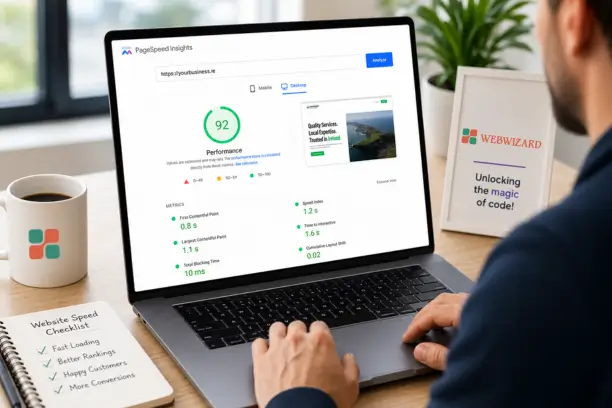
The two tools used most widely are Google PageSpeed Insights and GTmetrix. PageSpeed Insights gives you separate scores for desktop and mobile and tells you exactly which issues are dragging your score down. GTmetrix gives you a waterfall chart showing which files are taking longest to load. Both are free. Run your test on your homepage and on one of your key service pages - the results are often quite different.
Pay particular attention to your mobile score. Most visitors to an Irish business website are on their phones. If your mobile PageSpeed score is below 50, that is a genuine problem. Between 50 and 75 is acceptable but improvable. Above 90 is where you want to be.
Do not obsess over hitting a perfect 100. That is rarely achievable on a real business site with analytics scripts, chat widgets, and third-party tools loaded. Focus on the improvements that will have the most impact for actual visitors, not the score itself.
[IMAGE: GTmetrix waterfall chart showing page load time breakdown for a WordPress business website in Ireland]
The WordPress Speed Checklist: Eight Fixes That Make the Biggest Difference
These are ordered by impact. Working through them in sequence will give you the biggest gains fastest, rather than jumping to the more technical fixes while the obvious ones remain unaddressed.
1. Install a Caching Plugin
WordPress builds each page dynamically every time someone visits. It queries the database, runs PHP code, and assembles the HTML - all in real time. Caching skips most of that by serving a pre-built version of the page to subsequent visitors. This is the single most impactful change you can make. WP Rocket is the most well-regarded paid option and costs around €50 per year for a single site. It handles caching, minification, lazy loading, and CDN integration in one place, which makes it particularly suited to business owners who do not want to manage multiple separate plugins. W3 Total Cache and LiteSpeed Cache are solid free alternatives. If you are on managed WordPress hosting with SiteGround or Kinsta, server-level caching may already be built in.
2. Optimise Your Images
Images are typically the largest files on any WordPress page and the most common cause of slow load times. A photograph uploaded straight from a phone camera can be three to six megabytes. A properly compressed web version of the same image should be under 200 kilobytes, with no visible loss of quality to a visitor's eye.
The fix is two-part: compress the images already on your site and convert future uploads automatically. Smush and ShortPixel are both established plugins for this. ShortPixel also converts images to WebP format, which is smaller than JPG or PNG and is now supported by all modern browsers. For images you have not yet uploaded, always resize and compress before uploading rather than pushing full-resolution files directly into WordPress.
3. Use a CDN
A content delivery network stores copies of your website's static files - images, CSS, JavaScript - on servers in multiple locations around the world. When someone in Galway visits your site, they are served those files from a nearby server rather than from wherever your hosting is based. Cloudflare is the most popular option for small business sites and offers a free tier that is perfectly adequate for most cases. It is not complicated to set up and the speed improvement, particularly for visitors on mobile connections, is immediately measurable.
4. Minify CSS and JavaScript
Every time someone loads your site, their browser downloads your CSS and JavaScript files. These files often contain formatting spaces, line breaks, and comments that make them readable for developers but add unnecessary file size. Minification removes all of that and typically reduces file sizes by 20 to 40 per cent. WP Rocket handles this automatically as part of its standard setup. If you are using a free caching plugin, Autoptimize is a dedicated free plugin for minification that works well alongside it.
5. Review and Remove Unnecessary Plugins
Every active plugin you have installed adds load to your site. The question is not how many you have - some sites run 30 plugins without issue - but whether each one is earning its place. Deactivate anything you are not actively using. Delete plugins you have not touched in over six months. Common offenders include sliders with heavy animations, social sharing buttons that load scripts on every page, and plugins installed for a one-off purpose that were never removed. Leaving outdated plugins active creates performance and security risks at the same time, so this is one of the most worthwhile housekeeping tasks on your site.
6. Enable Lazy Loading
Lazy loading means images below the visible area of the screen do not load until the user scrolls down to them. This reduces the initial page load time significantly on image-heavy pages. WordPress has had native lazy loading built in since version 5.5, so on most sites it is partially active already. For more complete lazy loading including videos, iframes, and background images, WP Rocket or a dedicated plugin like Lazy Load by WP Rocket handles this comprehensively.
7. Clean Your Database
Over time, your WordPress database accumulates clutter: thousands of post revisions, spam comments, orphaned data from deleted plugins, and expired transient records. None of this affects how your site looks, but it bloats the database and slows down queries. WP-Optimize is a free plugin that clears this out safely. Run it quarterly and your database will stay lean. If you also want to limit how many revisions WordPress saves in the first place, a single line can be added to your wp-config.php file - a developer can do this in under five minutes as part of routine WordPress website maintenance.
8. Review Your Hosting
If you are on the cheapest shared hosting plan you could find three or four years ago, no amount of caching and image compression will make your site truly fast. Shared hosting puts your site on a server with hundreds of others. When one of those sites gets a traffic spike, everyone on that server slows down. Moving to a managed WordPress host like SiteGround, Kinsta, or WP Engine will typically have a bigger performance impact than all the other fixes combined. It costs more, but for a business that depends on its website to generate leads, it is a cost that pays for itself.
[IMAGE: WordPress plugin admin panel showing caching and image optimisation plugins installed on an Irish small business website]
WordPress Speed Tools at a Glance
| Tool | What It Does | Cost | Best For |
|---|---|---|---|
| WP Rocket | Caching, minification, lazy loading, CDN integration | From €50/year | Most business sites - all-in-one solution |
| Smush | Image compression and lazy loading | Free / Pro | Sites with a large number of images |
| ShortPixel | Image compression and WebP conversion | Free / Pay-per-image | High-volume image sites, ecommerce |
| Cloudflare | CDN, DNS, firewall, performance caching | Free / Pro | Any site wanting faster delivery and security |
| WP-Optimize | Database cleaning and optimisation | Free / Pro | Sites over two years old |
| Autoptimize | CSS and JavaScript minification | Free | Sites not using WP Rocket |
| GTmetrix | Speed testing and file-level diagnostics | Free | Diagnosing specific speed bottlenecks |
| Google PageSpeed Insights | Core Web Vitals testing and recommendations | Free | Checking your Google performance score |
Fictional Case Example: O'Sullivan Interiors, Galway
Fictional Case Example: O'Sullivan Interiors is a small interior design studio in Galway with a WordPress portfolio site. When they ran a GTmetrix test, their homepage took 8.4 seconds to load on mobile. The culprit was a combination of three uncompressed hero images (each over 3MB), an unused slider plugin still active from an old redesign, and no caching configured.
After running ShortPixel to bulk-compress existing images and convert them to WebP, removing the unused slider plugin, and installing WP Rocket with Cloudflare, their load time dropped to 1.9 seconds. Their mobile bounce rate fell from 74% to 49% within six weeks. They had not changed a single word of content. The site just finally loaded quickly enough for visitors to actually engage with it.
Common WordPress Speed Mistakes That Set Irish Businesses Back
Installing multiple caching plugins at once
This is more common than you would think. Two caching plugins running simultaneously will conflict with each other and can actually slow your site down or break it entirely. Pick one and stick with it. If you are not sure what is installed, check your Plugins screen and deactivate anything with "cache" in the name except the one you are actively using.
Uploading images straight from a camera or phone
A fresh photo from a modern smartphone can be 4 to 8 megabytes. Uploading it directly to WordPress without compression is one of the fastest ways to accumulate a slow site. The image looks no better to a visitor than a properly compressed 150KB version. Always resize and compress before uploading, or install a plugin that handles it automatically on upload going forward.
Using a theme loaded with features you do not need
Page builder themes like Divi and Avada come with dozens of built-in components - sliders, animation libraries, icon packs - many of which load on every single page of your site whether you use them or not. A leaner theme will almost always outperform a feature-heavy one on speed. If your site was built with a heavy theme several years ago, a rebuild using a lighter foundation is worth considering as part of a broader WordPress website redesign.
Ignoring mobile performance
Running a speed test from your office desktop and getting a good score does not mean your mobile visitors are having the same experience. Always test on mobile. A site that loads in 1.8 seconds on desktop can take five seconds on a 4G mobile connection if images are not compressed and lazy loading is not active. Most of your Irish customers are visiting on their phones. That is where the performance needs to hold up.
Treating speed optimisation as a one-time job
A speed fix done once will gradually erode as you add content, install new plugins, and upload more images. Speed needs ongoing attention, not a single afternoon of work followed by years of neglect. If you do not have the time or inclination to manage this yourself, monthly website maintenance packages are specifically designed to catch these issues before they compound.
How WordPress Speed Affects Your Google Rankings in Ireland
Google has confirmed page speed as a ranking signal for mobile search results. But the connection runs deeper than just raw loading time. Google measures Core Web Vitals, which assess three specific things: Largest Contentful Paint (how quickly the main content becomes visible), Interaction to Next Paint (how fast the page responds to a click or tap), and Cumulative Layout Shift (whether the page jumps around as it loads, which is irritating and penalised).
A WordPress site that fails Core Web Vitals thresholds is at a disadvantage in search, even if its content is strong and its on-page SEO is in good shape. For Irish businesses trying to rank for local searches - a solicitor in Dublin, a physio in Cork, a builder in Westmeath - this can make a real difference between appearing on page one or somewhere on page two. Page two, for most search queries, is effectively invisible.
The good news is that fixing your WordPress speed improves your Core Web Vitals scores at the same time. The two are closely linked. A site that loads in under two seconds, with properly compressed images and no render-blocking scripts, will typically pass all three Core Web Vitals thresholds. That is a meaningful competitive advantage in local search. If you want to understand how speed fits into a broader SEO strategy for your Irish business, our SEO service covers both together.
Where to Start If This All Feels Overwhelming
Start here: run a free Google PageSpeed test on your homepage, note the top three issues flagged, and fix those first. In most cases, uncompressed images and missing caching account for 80% of the problem. Those are both fixable in an afternoon without any developer help.
You do not need to implement everything at once. Each improvement is cumulative. Installing WP Rocket and running ShortPixel across your existing images will often halve your load time before you have touched anything else. From there, adding Cloudflare and cleaning the database takes you further still.
Speed is one of those things that rewards consistent attention. A site that loads in 1.5 seconds is not just faster than a site that takes 4 seconds. It converts better, ranks better, and makes a stronger first impression on every single visitor. For a business that depends on its website to generate leads and enquiries, that is not a marginal gain. It is a material one.
If your WordPress site is overdue a performance review, or if you have worked through this checklist and are still seeing slow load times, our team at Web Wizard can help. We work with Irish businesses to improve site speed, fix Core Web Vitals, and keep WordPress sites running well on an ongoing basis. Get in touch for a no-obligation chat about what your site needs.