Introduction
If you run training courses in Ireland, you already know the pattern: someone rings or emails asking about your next Safe Pass, first aid or accounting course, you quote them a price, they say they'll "get back to you", and half the time they never do. A course or training website with online payment closes that gap. Instead of a phone call and a bank transfer that might never land, the visitor sees the next available date, pays there and then, and the place is theirs before they've had time to talk themselves out of it.
This guide walks through exactly what that kind of site needs: the core building blocks, the platform choice between WordPress plugins, dedicated LMS tools and custom builds, how to get payment, VAT and refunds right for the Irish market, and the SEO groundwork that actually matters for course pages. We'll also walk through a real Irish training website we built with exactly this setup, so you can see what it looks like once it's live rather than just in theory.
Why Course and Training Providers in Ireland Need Online Payment
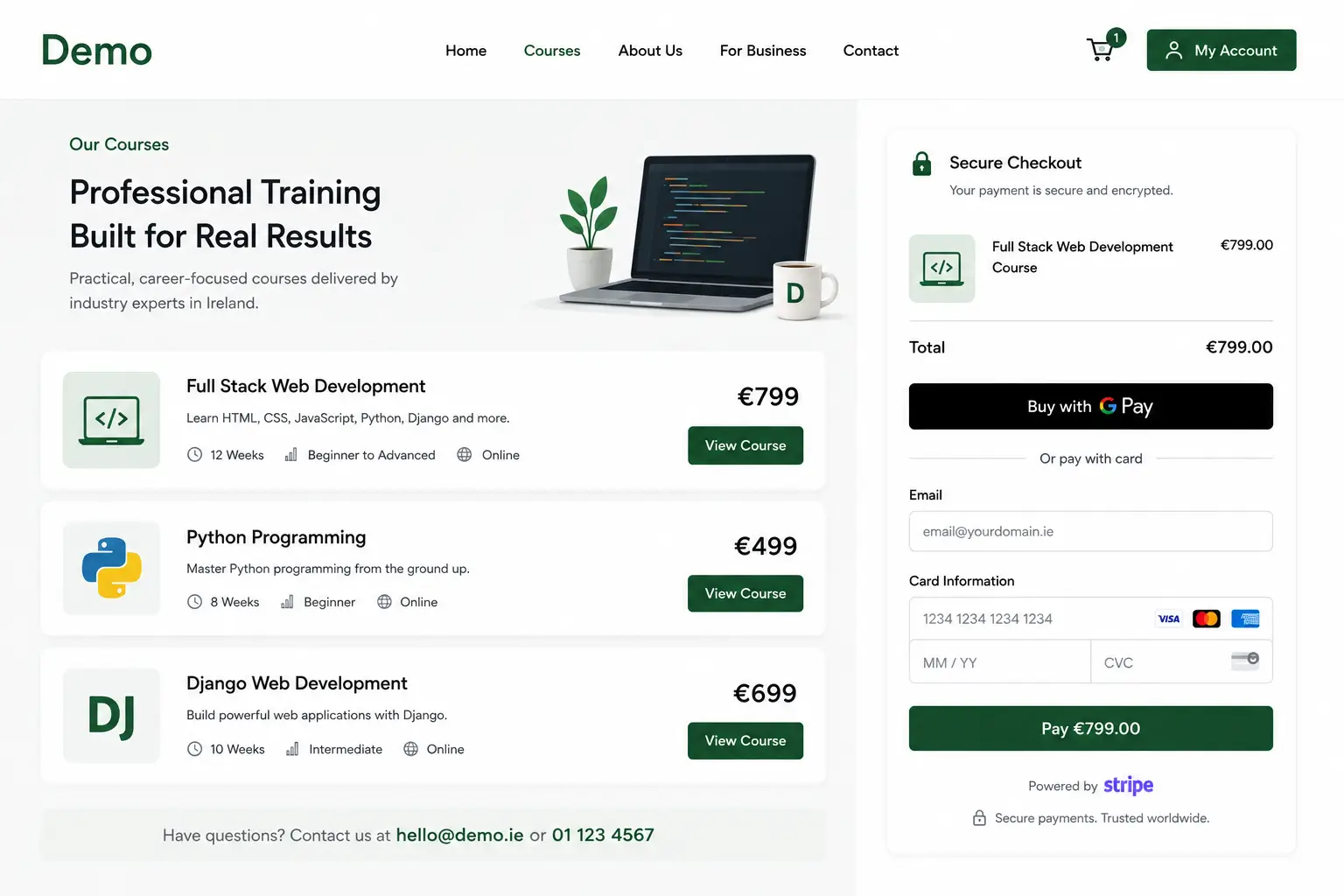
A course or training website with online payment lets a customer choose a session, pay by card immediately, and receive an automatic confirmation, with no phone call, invoice or manual chasing required from the provider. For a training business, that single change usually does more for revenue than any amount of extra marketing spend, because it removes the delay between interest and commitment.
Delay is the enemy in training sales specifically. A lot of course bookings are compliance-driven: an employer needs staff certified in Manual Handling before a site inspection, a contractor needs a Safe Pass card before they're allowed on a job. That buyer is not browsing, they're on a deadline. If your site makes them wait for a callback to confirm a date and take payment, a chunk of them will simply book with whichever competitor lets them pay now. The training sector in Ireland is more compliance-driven than most retail categories, which is exactly why payment friction costs more here than it would for, say, a clothing shop.
There's an administrative saving too, and it's easy to underestimate until you've lived without it. Every booking that used to mean an invoice, a bank transfer reference to chase, and a manual calendar entry becomes one line item that reconciles itself. For a sole-operator training business, that's often the difference between spending Friday afternoon on admin or spending it delivering the next course.
The Core Building Blocks of a Course or Training Website
Every course or training website that actually converts needs the same handful of moving parts working together. Miss one and the whole booking journey stalls somewhere before payment.
Course or listing pages
Each course needs its own page: what it covers, who it's for, how long it runs, what certification is awarded, and the next available dates. Cramming six courses onto one "Training" page might feel efficient to build, but it's terrible for both conversion and SEO structure, because visitors and search engines can't tell which page answers which query.
Scheduling and calendar for live or in-person sessions
If courses run on fixed dates, whether in a classroom, on-site at a client's premises, or over a live video call, the site needs a real calendar showing genuine availability, not a static "contact us for dates" line. Event-based booking plugins handle this well on WordPress; dedicated LMS platforms usually build it in for cohort-based courses. If you want the general mechanics of appointment-style booking outside the course context, our guide to adding an online booking system to a website in Ireland covers the same underlying calendar and reminder logic.
Secure checkout and payment
This is the step that actually converts interest into revenue, and it needs to work in three taps on a phone. We'll cover the specifics below, but the short version is: use a proper payment gateway, never a card form you built yourself.
Automated confirmation and reminder emails
The moment payment clears, the buyer needs an email confirming the date, the location or link, and what to bring. A reminder 24 to 48 hours before the session cuts no-shows significantly, and for compliance courses, a joining instructions email that states ID requirements (a PPS number for SOLAS courses, for example) avoids people turning up unable to sit the course at all.
Certificates and completion tracking
If your courses issue a certification, whether that's a QQI award, a SOLAS card, or your own completion certificate, decide early whether that's generated automatically through an LMS, issued manually by you after the session, or handled through a third-party accrediting body. This affects which platform you need, so it belongs in the planning stage, not as an afterthought once the site is built.
WordPress Plugins, Dedicated LMS, or Custom Build: Choosing Your Platform
There is no single right answer here, and any guide that tells you there is hasn't actually built one of these sites. The right platform depends on whether your courses are scheduled live sessions, self-paced online modules, or a mix of both, and on how much control you want over the checkout experience.
WordPress with a booking or LMS plugin is the right starting point for most Irish training providers, especially those running scheduled, in-person or live courses like safety training, first aid, or professional certifications. Plugins such as Amelia, Bookly or LearnDash give you course listings, calendars, Stripe or PayPal checkout, and automated emails, all under your own domain, with no per-booking commission taken by a third party. You keep full ownership of customer data and course content.
A dedicated LMS platform (Thinkific, Teachable, LearnWorlds) makes more sense if your business is primarily self-paced online course content: video modules, quizzes, drip-fed lessons, and student progress tracking. These platforms handle the learning experience better out of the box than a WordPress plugin does, but you're trading some control and, usually, a percentage-based or monthly fee, for that convenience. A WooCommerce-based build is a middle ground worth knowing about too, particularly if you're already selling physical training materials or merchandise alongside courses; our ecommerce website design service covers that combined setup.
A custom-built system is worth the extra cost only when your booking or learning logic is genuinely unusual: multi-location scheduling with different instructors, member pricing tiers, integration with an internal CRM or a accrediting body's own certification system. This is custom web application development territory, and for most training providers it's not needed at launch, even if it becomes worth revisiting once the business scales.
| Approach | Best for | Typical cost | Ownership and control | Main drawback |
|---|---|---|---|---|
| WordPress + booking/LMS plugin | Scheduled, in-person or live courses (safety, first aid, professional training) | ~€1,500-€4,500 build, plus €70-€250/year plugin licence | Full ownership, no commission per booking | Needs regular plugin updates and maintenance |
| Dedicated LMS platform | Self-paced online courses with video, quizzes and drip content | Free to start, then ~€30-€200/month depending on plan | Content lives on their platform | Monthly fees and/or transaction commission scale with growth |
| Custom-built system | Complex scheduling, member pricing, or CRM/accreditation integration | €4,000-€25,000+ | Complete control, built exactly to spec | Highest upfront cost and longest build time |
Honestly, most Irish training providers overthink this decision. If you run scheduled courses with a fixed number of places, a well-configured WordPress website with a booking plugin will do everything a dedicated LMS does for a live-session business, at a fraction of the ongoing cost. Save the LMS platform for when self-paced content genuinely becomes the core of what you sell. And if you're comparing quotes from a few different developers before committing, our guide on evaluating a web design quote in Ireland lists what should actually be included in that price.
Ready to Take Course Bookings Online?
Course booking and Stripe payment built into your website from day one | No hidden fees | Free consultation
Getting Online Payment Right for an Irish Training Business
Payment is where most training providers either lose the sale at the last second or open themselves up to a compliance headache they didn't know they had. Get these five things right and you avoid both.
Use a compliant payment gateway, never handle card data yourself
Stripe is the payment gateway we use most often on Irish course and training websites, because it keeps the checkout on your own site rather than redirecting to a third party, which reduces drop-off, and it supports one-off payments, deposits and instalment plans out of the box. The general best-practice principle here matters more than the specific brand: a business taking card payments online should always use a payment processor that handles the card data directly and is responsible for its own compliance, rather than building or storing card capture yourself. That's true whether you use Stripe, PayPal, or another established provider. It keeps your own WordPress installation lean, reduces your risk, and is simply the standard, sensible way to take payments online in 2026.
Decide between deposits and full payment upfront
For lower-cost, single-day courses (Manual Handling, First Aid), full payment at booking is standard and expected. For higher-value, multi-day or group training, a deposit of 20-30% at booking with the balance due before the course start date reduces the barrier to commit while still protecting you from a fully unpaid no-show. Whichever you choose, state it clearly on the booking page before checkout, not in the small print afterwards.
Write a clear refund and cancellation policy
Course places are usually limited, so a no-show or late cancellation has a real cost: an empty seat you couldn't resell. A plain-English policy, for example "full refund up to 5 working days before the course, 50% refund inside that window, no refund inside 48 hours, transfers to a future date always available", removes the awkward conversation entirely because the customer agreed to it at checkout. Vague policies generate far more disputes than strict-but-clear ones.
Keep checkout mobile-first
A large share of course bookings, especially from tradespeople and construction workers booking compliance training, happen from a phone between jobs, not from a desk. Test your checkout on your own mobile before launch: can you select a date, enter card details, and get a confirmation in under a minute, one-handed? If not, fix it before it costs you bookings. A slow-loading checkout page loses bookings just as surely as a confusing one, so it's worth running your site through our WordPress speed checklist before launch too.
A Real Irish Training Website Built With Course Booking and Online Payment
Rather than talk in the abstract, it's worth looking at how this comes together on a real, live Irish training website. We built the website for Setanta Safety and Training Ltd, a certified workplace safety training and consultancy business based in Ferrybank, Co. Waterford, run by Ken Walsh, who brings 35 years of frontline and management experience in construction and health and safety.
Before the new site, every course booking, Safe Pass, Manual Handling, First Aid Response, Working at Height and the rest, went through phone and email, with payment confirmed manually by bank transfer. We built a WordPress site with an event-based course booking plugin and a Stripe payment gateway integrated directly into the checkout, so a visitor can view available course dates, select a session, and pay securely in one uninterrupted journey, with an automated confirmation email sent the moment payment clears. A customer account portal lets registered clients view their own bookings without contacting the business directly, and card data is never stored on the WordPress installation itself, keeping the setup GDPR-compliant.
The result was a fully self-serve booking pathway for individual course bookers, alongside a separate, clearly structured services section for the consultancy side of the business (Safety Statements, Safety Management Systems, auditing), so employers researching consultancy work weren't funnelled through a booking flow built for someone paying for a single Safe Pass course. That separation matters: a training or safety business is often selling two different things to two different buyers, and the site needs to serve both without either one drowning out the other.
Want a Booking-Ready Course Website Like This One?
Custom, SEO-ready course and training websites from €1,500 | Stripe payment built in | Live in weeks, not months
Building Trust That Actually Converts Course Bookings
A buyer paying upfront for a course they haven't experienced yet needs more reassurance than someone browsing a product page. Trust signals do most of the conversion work here, arguably more than design polish does.
Instructor credibility matters more in training than in almost any other sector. Ken Walsh's 35 years of industry experience is stated clearly on the Setanta Safety about page, not buried in a footer bio, because for a sole-operator compliance business, the instructor's credentials are the entire reason to book with them over a national provider. If you or your trainers hold specific accreditations, memberships, or years of hands-on experience, that belongs near the top of your course pages, not just your about page. This is the kind of first-hand, verifiable detail Google's own guidance on E-E-A-T rewards, and it's also simply what a nervous buyer wants to see before they hand over payment.
Reviews and testimonials, transparent pricing shown on the page rather than hidden behind a "contact us for pricing" form, and a genuinely low-friction booking flow all compound. Remove any one of them and conversion drops, sometimes sharply. The same pattern shows up when we build trust on a new ecommerce store: people don't pay upfront for something they don't trust, whether that's a physical product or a training course. If your service or course pages aren't currently built to carry this kind of trust content clearly, our guide to building a service page that converts covers the structure in more depth, and the same principles apply directly to a course listing page.
SEO Basics for Course and Training Websites
A course or training website ranks best when each course has its own dedicated page with a clear title, a specific description, and unique content, rather than several courses sharing one generic "Training" page. Google also supports Course structured data specifically for this content type: marking up course name, provider and description, alongside a course list page, makes your courses eligible to appear in an enhanced course list result in Google Search, provided you mark up at least three courses and avoid promotional language like pricing or discounts in the course title itself.
Beyond structured data, the fundamentals that actually move rankings for course sites are unglamorous but effective. One page per course or topic, never several crammed together. Genuinely unique descriptions for each course rather than the same paragraph reworded, since thin or duplicate course pages are one of the fastest ways to suppress your own visibility. A clean, flat site structure that gets a visitor from homepage to a specific course page in two clicks. And location-modified course titles where relevant: "Manual Handling Training Waterford" will out-rank a generic "Manual Handling Course" page for anyone actually searching locally, because it matches the query more precisely.
If your training business also handles group or corporate enquiries alongside individual course bookings, keep those pages structured and titled separately too. Search engines, and human visitors, both reward pages that answer one specific question clearly over pages trying to be everything at once. If SEO for your course pages feels like a job on its own, that's because it is; it's worth reading what our SEO service for Irish businesses actually covers before you try to bolt it on yourself after launch.
Setting Up Your Course or Training Website: A Practical Checklist
Once you've chosen a platform and worked out your VAT position, the build itself follows a fairly predictable order.
- List every course with its name, duration, price, certification awarded, and eligibility requirements (age, ID, prerequisites)
- Choose your platform: WordPress with a booking/LMS plugin, a dedicated LMS, or a custom build, based on whether your courses are scheduled or self-paced
- Set up your calendar with real availability, including buffer time between sessions and a minimum booking notice period
- Integrate Stripe or another compliant payment gateway, and decide deposits versus full payment per course type
- Write your refund and cancellation policy and display it on the booking page before checkout, not after
- Configure automated confirmation and reminder emails, including any joining instructions or ID requirements
- Build one dedicated page per course with unique content, and add Course structured data if you have three or more courses listed
- Test the entire booking and payment flow yourself, on a phone, before launch
Common Mistakes When Setting Up a Course or Training Website
Building a "contact us for a quote" course page
If a visitor has to submit a form and wait for a reply before they even know the price, most of them won't bother. Show pricing on the page. If pricing genuinely varies (custom group training, for example), show a starting price and a clear path to a quick quote, not a dead end, and make sure the booking button itself uses wording that actually gets clicked; see our post on writing a call to action that gets clicked for the detail.
Skipping the VAT question until pricing is already public
Providers who launch a course website, start taking bookings, and only then check whether VAT applies sometimes have to retroactively adjust pricing or absorb a VAT liability they hadn't priced in. This is entirely avoidable by checking your position with Revenue or an accountant before the site goes live, not after.
Choosing an LMS platform for a business that runs live, in-person courses
Dedicated LMS platforms are built around video content and self-paced learning. Forcing a scheduled, in-person safety course into that model usually means fighting the platform rather than using it, when a WordPress booking plugin would have matched the business model far more naturally.
Storing or handling card details outside a proper payment gateway
Never build a form that collects and stores card numbers directly. Route every payment through a compliant processor like Stripe, which is built to handle that responsibility. This is standard practice, not a nice-to-have, and it protects both you and your customers.
Launching the site and never testing the booking flow again
Payment integrations fail quietly. An expired API key, a plugin update that breaks the checkout step, a certificate that stops auto-generating: none of these announce themselves until a customer can't book, or worse, pays and gets nothing. Test the full flow monthly, or put it on a website maintenance plan so someone else is checking it for you. If plugin updates are the concern, our post on what happens when you don't update WordPress plugins explains exactly how that failure tends to happen.
Getting Your Course or Training Website Live and Taking Payment
The businesses that get this right treat the website as part of the sales process, not a digital brochure sitting beside the real business happening over the phone. List your courses properly, pick the platform that actually matches how you deliver training rather than the one with the flashiest marketing, get your VAT position confirmed before pricing goes public, and put a compliant payment gateway between your customer and their card details. Everything else, the reminder emails, the certificates, the reviews, builds on that foundation.
If you'd rather have this built properly the first time, we design and develop course and training websites for Irish businesses with booking, Stripe payment and SEO built in from launch, the same approach used on the Setanta Safety and Training project above. You can read more about how we work on our about page. Get in touch with Web Wizard for a no-obligation conversation about what your course business actually needs, and we'll tell you honestly whether a WordPress build, an LMS, or something custom is the right fit.