Introduction
Conversion rate optimisation turns existing traffic into more leads and sales. Learn the CRO audit process, A/B testing, tools, and proven tactics for 2026.
Conversion rate optimisation is one of the highest-return activities any business can invest in, yet most websites are built, launched, and then largely left to perform on their own. If your site is getting traffic but not generating enquiries, bookings, or sales at the rate you expect, the problem is rarely the traffic itself. It is almost always the experience your visitors have when they arrive. This guide explains what CRO involves, how to run your first audit, which tools to use, how to test changes properly, and the most common mistakes that undermine results, whether you run an ecommerce store, a SaaS product, or a professional services website.
What Conversion Rate Optimisation Actually Means
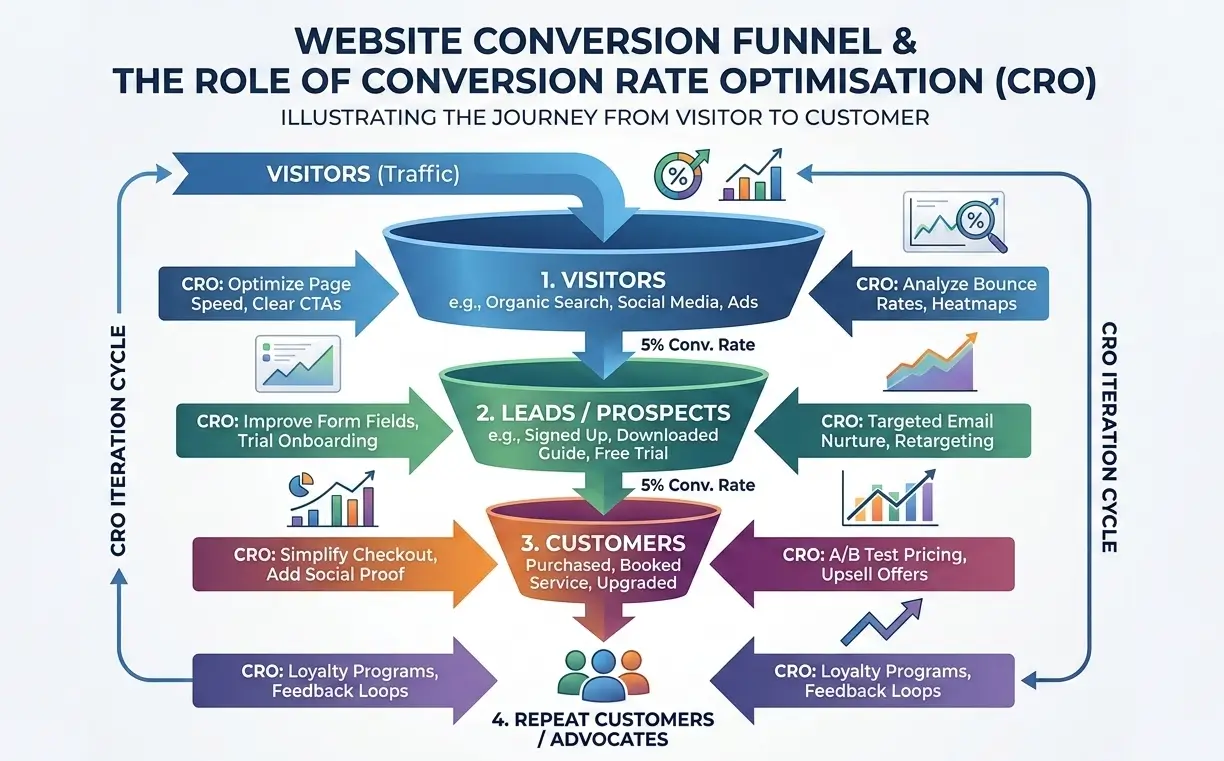
Conversion rate optimisation is the structured process of increasing the percentage of website visitors who take a desired action. That action could be completing a purchase, submitting an enquiry form, booking a consultation, signing up for a newsletter, or downloading a resource. The conversion rate itself is a simple calculation: divide the number of conversions by the number of sessions, then multiply by one hundred.
What makes CRO valuable is that it works on your existing traffic. Rather than spending more on paid advertising or SEO to attract additional visitors, you focus on getting more value from the visitors already arriving. If your website currently converts one in every hundred visitors and you improve that to two in every hundred, you have doubled your output without spending an extra penny on acquisition.
It is also worth distinguishing between macro-conversions and micro-conversions. A macro-conversion is the primary goal, such as a completed sale or a submitted lead form. Micro-conversions are the smaller steps that lead there: clicking a pricing link, watching a product video, scrolling to the contact section, or adding an item to a basket. Tracking micro-conversions matters because they reveal where visitors are engaged and, more importantly, where they stop engaging before reaching your main goal.
For marketing managers, the value of CRO is straightforward. It improves the efficiency of every advertising channel you run. For ecommerce store owners, it is the difference between a store that covers its costs and one that grows profitably. For SaaS founders, improving the conversion rate from trial to paid subscription is often more impactful than any feature release.
How to Calculate Your Conversion Rate and Benchmark It
The formula is: (Conversions / Total Sessions) x 100 = Conversion Rate %
For example, if your website received 4,000 sessions last month and 80 of those resulted in a completed enquiry form, your conversion rate is 2%.
Average conversion rates vary significantly by industry and conversion type. Ecommerce stores generally see rates between 1% and 4% for completed purchases, though this differs by sector, traffic source, and device type. Lead generation pages for professional services tend to perform between 3% and 8% when properly optimised. If you are unsure whether your rate is strong, the most useful comparison is your own previous performance over time rather than a generic industry average, since your traffic mix, pricing, and offer are unique to you.
Google Analytics 4 is the tool most businesses use to track conversions. Setting up goal completions within GA4 for each meaningful action on your site gives you the baseline data your CRO work depends on. Without reliable tracking in place, any changes you make are essentially guesses.
The CRO Audit Process: How to Identify What Is Holding Your Site Back
A CRO audit is a structured review of your website to identify friction points, UX failures, and conversion barriers. It is the logical starting point before any testing or redesign work begins. Running changes based on gut feeling without auditing first is the most common reason CRO efforts produce no measurable improvement.
Step 1: Define Your Goals and Identify Micro-Conversions
Before any data review, write down exactly what a successful visit looks like. List your primary conversion goal, then identify two to four micro-conversions that indicate a visitor is moving in the right direction. These will become your tracking events in GA4. Without this step, your audit has no reference point.
Step 2: Analyse Behaviour With Heatmaps, Clickmaps, and Session Recordings
Heatmaps show you where visitors are clicking, moving, and stopping on each page. Clickmaps reveal which elements are receiving attention and which are being ignored. Session recordings let you watch anonymised real user journeys through your site, which often surfaces problems no amount of data analysis would find. Tools such as Hotjar, Microsoft Clarity, and Crazy Egg all provide these capabilities. Microsoft Clarity is free and a practical starting point for businesses that have not run heatmap analysis before.
What you are looking for during this stage: rage clicks (where users click something repeatedly that does not respond), high exit rates on pages that should be transitional, form fields that are being abandoned partway through, and calls to action that are being skipped despite being visible.
Step 3: Map the Customer Journey and Find Funnel Drop-Off Points
Customer journey mapping means tracing the path a visitor takes from first landing on your site to completing your conversion goal. In GA4, the funnel exploration tool allows you to visualise exactly how many users proceed from step to step and at which point the majority leave. A high drop-off between your product page and checkout, for example, is a clear signal that something is interrupting the decision at that precise point. Common culprits include unexpected shipping costs, too many form fields, unclear return policies, or a lack of trust signals near the point of purchase.
Landing Page Optimisation Tips You Can Act on Immediately
Landing pages are the highest-leverage pages for conversion rate work because they receive focused, often paid, traffic with a specific intent. The following are landing page optimisation tips that consistently improve performance across ecommerce, lead generation, and SaaS scenarios.
- One page, one goal. A landing page should have a single, clearly defined conversion action. Every additional link, navigation option, or secondary offer reduces the likelihood of the visitor completing your primary goal.
- Lead with the outcome, not the process. Visitors respond to what they gain, not what you do. "Get your kitchen fitted in three days" outperforms "We offer kitchen installation services" every time.
- Place your primary call to action above the fold. A visitor should not need to scroll to understand what you want them to do next. The CTA should be visible on first load across mobile and desktop.
- Use social proof at the point of decision. Testimonials, review scores, case study references, and client logos placed near your CTA reduce the psychological resistance that causes visitors to hesitate.
- Reduce form fields to the minimum viable number. Every additional field you ask a visitor to complete reduces completion rates. Ask only for what you actually need at this stage. You can collect additional information later.
- Address objections directly in the copy. If your price, timeline, or service scope is a common concern, address it on the page rather than hoping visitors will call to ask. Unanswered objections become exit triggers.
- Ensure page load speed is not losing you conversions. A page that takes more than three seconds to load on mobile will lose a significant proportion of visitors before they read a single word. Google's PageSpeed Insights gives you a free, accurate diagnosis of where your page performance is falling down.
A/B Testing for CRO: How to Run Tests That Give You Reliable Results
A/B testing for CRO involves showing two versions of a page or element to different segments of your traffic simultaneously, then measuring which version produces more conversions. It is the foundation of evidence-based CRO, but it is also frequently done in a way that produces misleading results.
The most important rule is to test one variable at a time. Changing the headline, the CTA colour, and the form layout simultaneously means you cannot attribute any improvement to a single change. Test the headline first. Once you have a winner, test the CTA. Work through changes sequentially rather than in batches.
Statistical significance matters. A test that runs for two days with fifty conversions per variant will not give you reliable data. Most testing tools display a statistical confidence percentage. A result needs to reach 95% confidence before you treat it as a genuine finding rather than random variation. This typically requires several hundred conversions per variant, which means lower-traffic sites need to be selective about what they test and run tests over longer periods.
Multivariate testing allows you to test multiple variables simultaneously and understand how combinations of changes interact with each other. It requires significantly more traffic than a standard A/B test to reach statistical significance, making it more suitable for high-volume pages on established sites.
| Feature | A/B Testing | Multivariate Testing |
|---|---|---|
| Variables tested | One at a time | Multiple simultaneously |
| Traffic required | Moderate | High |
| Complexity | Low | High |
| Best for | Small to medium sites testing specific elements | High-traffic pages testing layout combinations |
| Time to results | Weeks | Months |
| Recommended starting point | Yes | Only after A/B experience |
CRO Tools Worth Using in 2026
The CRO tools available in 2026 cover everything from basic behaviour analysis to full testing platforms. The right combination depends on your budget, traffic volume, and technical resource. Below is a practical overview of the tools most commonly used in CRO workflows today.
| Tool | Primary Use | Pricing | Best For |
|---|---|---|---|
| Microsoft Clarity | Heatmaps, session recordings, clickmaps | Free | All businesses starting out with CRO |
| Hotjar | Heatmaps, session recordings, surveys | Free plan, paid from ~€39/month | SMEs and ecommerce sites |
| Google Analytics 4 | Traffic analysis, funnel exploration, goal tracking | Free | All websites |
| Google Optimize (sunset) | A/B testing (discontinued 2023) | N/A | Replaced by VWO or Optimizely |
| VWO (Visual Website Optimizer) | A/B testing, multivariate testing, heatmaps | From ~$199/month | Mid-market and ecommerce teams |
| Optimizely | Enterprise A/B and multivariate testing | Enterprise pricing | Large-scale SaaS and retail |
| Crazy Egg | Heatmaps, A/B testing, scroll maps | From $29/month | Small businesses wanting an all-in-one entry point |
For most small to medium businesses, Microsoft Clarity combined with Google Analytics 4 covers the behavioural and analytical data you need to run your first meaningful CRO audit at no cost. Adding a dedicated A/B testing tool like VWO or Crazy Egg makes sense once you have a clear hypothesis to test and enough traffic to reach statistical significance.
How Website Design and User Experience Affect Conversion Rate
CRO and UX are not separate disciplines. The design decisions made during a website build directly determine whether visitors convert, and remedial CRO work is always harder than building for conversion from the start. The following design factors have a consistent and measurable impact on conversion rate.
Visual hierarchy: The most important element on any page should be the most visually prominent. If your CTA button is the same visual weight as five other links on the page, there is no hierarchy guiding the visitor's attention.
Mobile experience: A significant proportion of web traffic arrives on mobile devices. Tap targets that are too small, forms that require pinch-to-zoom, or page layouts that break on smaller screens all increase exit rate sharply on mobile. Google also uses mobile performance as a ranking signal, meaning a poor mobile experience hurts both your SEO and your conversions simultaneously.
Page load speed: Every additional second of load time increases the probability of a visitor leaving before they convert. This is especially pronounced on mobile connections. Our web design services include Core Web Vitals optimisation as a standard part of every build precisely because performance directly affects both search rankings and conversion rates.
Trust signals: Visitors who do not know your business need reassurance before they convert. SSL certificates, privacy notices, recognisable payment logos, named testimonials with photos, professional photography, and clear contact information all contribute to the perception of trustworthiness. Absence of any of these raises subconscious doubt.
Form design: Forms are the most common point of conversion failure. Long forms, unclear labels, confusing error messages, and forms that do not save progress all increase abandonment. Form optimisation, the process of reducing friction and improving clarity at the point of submission, is one of the highest-return CRO activities for lead generation sites.
Fictional Case Example: How a CRO Audit Changed an Ecommerce Store's Results
Fictional Case Example: BrightLeaf Skincare, a small ecommerce store selling natural skincare products based in Galway, had consistent traffic from organic search but an average order conversion rate of 0.9%. After running a heatmap analysis using Microsoft Clarity, the team discovered that most visitors were scrolling past the "Add to Basket" button without clicking it, and that on mobile, the button was appearing below the fold on product pages. A further review of session recordings showed that visitors were regularly navigating away during checkout at the delivery cost step, where a €6.50 shipping fee was revealed for the first time.
Two changes were made: the product page layout was adjusted so the CTA appeared above the fold on mobile, and delivery costs were shown on the product page itself rather than only at checkout. Over the following six weeks, the conversion rate moved from 0.9% to 1.7%. No new traffic was purchased. No new products were added. The improvement came entirely from removing friction that already existed in the journey.
Common CRO Mistakes That Quietly Kill Conversions
Testing Without Enough Traffic
Running an A/B test on a page that receives 200 sessions per month is unlikely to produce statistically reliable results in a reasonable time frame. Small traffic volumes mean random variation can easily be mistaken for genuine performance differences. Before running split tests, confirm that the page receives enough sessions to reach 95% statistical significance within four to six weeks. If it does not, focus on qualitative analysis first: heatmaps, session recordings, and user feedback.
Changing Multiple Variables at Once
Redesigning a landing page entirely and calling it an A/B test is a common mistake. When too many elements change simultaneously, you have no way of knowing which change drove the result. CRO requires controlled, systematic testing. If you want to redesign a page, do so, but treat the new version as a full page test rather than element-level optimisation.
Optimising for Vanity Metrics
Improving your click-through rate on a CTA button is only meaningful if it leads to more completed conversions. Some changes improve engagement metrics while having no effect on revenue-generating actions. Always tie your CRO tests back to a goal completion that represents actual business value, whether that is a sale, a submitted form, or a booked appointment.
Ignoring the Post-Click Experience
If you are running paid ads and the CRO focus is entirely on the ad creative and targeting, you are missing the most controllable part of the funnel. The landing page that visitors reach after the click determines whether the ad budget returns a profit. A strong ad sending traffic to a weak page is one of the most common and most expensive CRO failures in ecommerce and lead generation campaigns.
Not Segmenting Your Traffic Before Drawing Conclusions
Conversion rates vary significantly by traffic source, device type, geographic location, and new versus returning visitors. Drawing conclusions from aggregate conversion data without segmenting it can lead to decisions that optimise for one segment at the cost of another. Mobile visitors and desktop visitors often have different conversion barriers. Review your data by segment before deciding where to focus.
How to Start Your First CRO Programme When You Have No Existing Data
If your website has never had heatmap tracking or proper goal configuration set up in GA4, the first step is not to start testing. It is to start listening. Install Microsoft Clarity today, configure goal completions in Google Analytics 4 for every meaningful action on your site, and let the data accumulate for four to six weeks before drawing any conclusions.
In parallel, conduct a heuristic evaluation: a structured walkthrough of your site from a first-time visitor's perspective. Walk through every page on mobile and ask: is it clear within five seconds what this page is for? Is the next action obvious? Does anything look broken, slow, or confusing? Are there any trust signals missing near conversion points? This exercise alone typically surfaces three to five high-priority improvements on any site that has not been through a CRO review before.
For ecommerce businesses looking to build a site that is structured for conversion from the outset, our ecommerce website development process incorporates CRO principles into the architecture, design, and checkout flow before a single page goes live. It is significantly more cost-effective than retrofitting optimisation onto a store that was not built with conversion in mind.
The other high-priority action for a site with no CRO history is to review your contact and conversion forms. Most businesses are surprised by how many form submissions are being abandoned once session recordings are in place. Reducing your main enquiry form to three to five fields instead of eight to twelve is consistently one of the fastest wins available, regardless of industry.
What Your Next Step Should Be
Conversion rate optimisation is not a one-off project. It is an ongoing programme of measurement, hypothesis, testing, and iteration. The businesses that see the most consistent improvement are those that treat CRO as a recurring process rather than a reactive fix. Start with the audit: install your behaviour analysis tools, configure your goals, review the data, and identify your highest-priority friction points. Then test one change at a time, measure the result, and keep what works.
If your website is not currently generating the volume of leads or sales your traffic should support, there is almost certainly a conversion barrier that a structured CRO review would surface. Get in touch with us and we can discuss what a practical CRO review and website improvement programme would look like for your specific business and goals.