
Introduction
Why Website Redesigns Fail (and How to Make Yours Succeed)
A poorly planned website redesign strategy costs far more than most business owners expect. Not just in budget overruns, but in lost organic traffic, broken user journeys, and months of recovery work that nobody budgeted for. The businesses that come out the other side with a stronger, higher-performing website treat the redesign as a strategic project from day one, not a cosmetic refresh.
If you are a business owner or marketing manager planning to redesign your website, this guide gives you the complete planning framework you need before anyone opens a design file or writes a single line of code. You will learn how to audit your current site, align your stakeholders, protect your SEO rankings, set realistic timelines, and build a redesign roadmap that produces measurable results.
Whether you are redesigning a five-page brochure site or a fifty-page service portal, the strategic principles are consistent. Get the strategy right and the execution becomes far more straightforward.
When Should You Redesign Your Website? Key Indicators
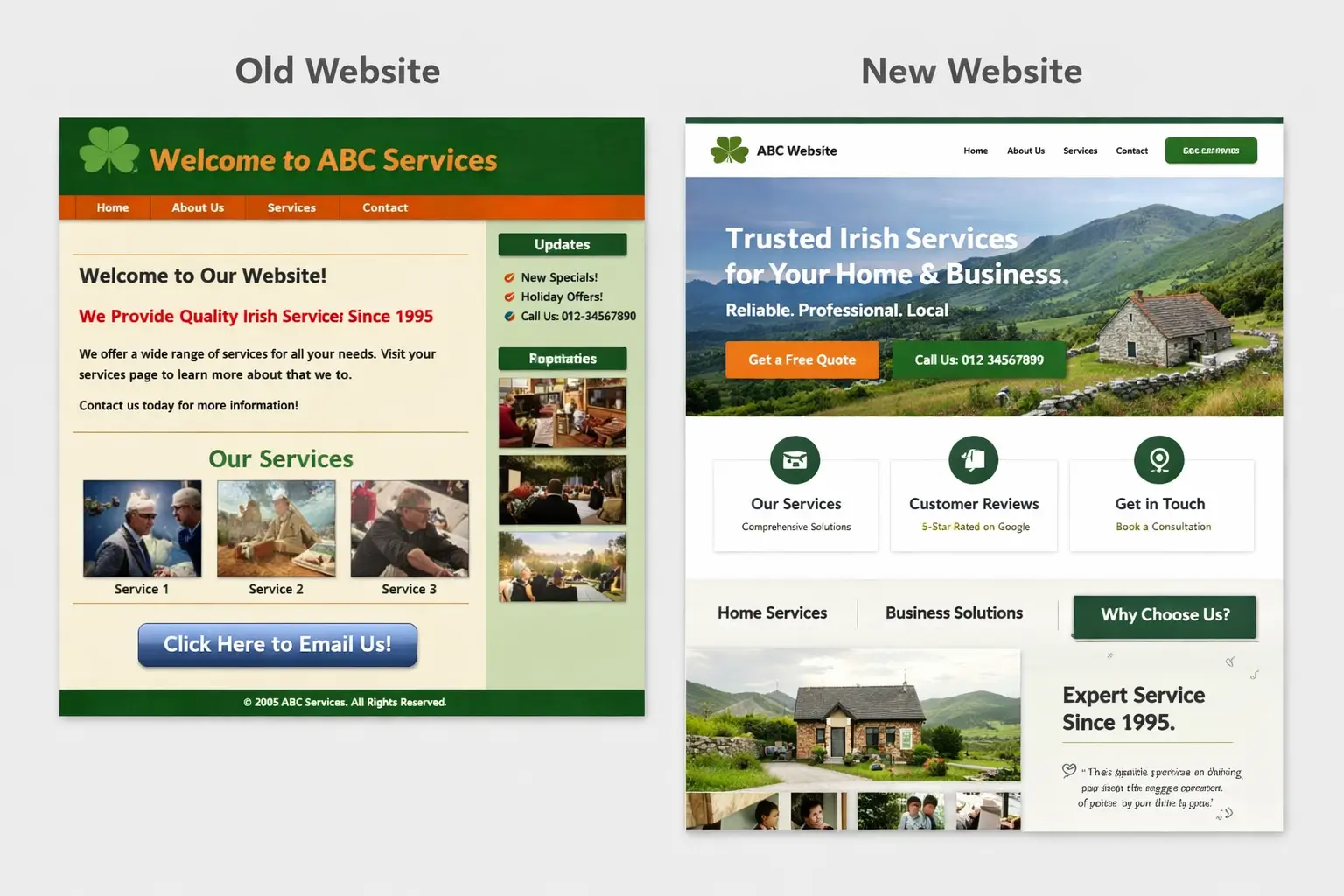
Not every website problem requires a full redesign. Sometimes targeted improvements to a landing page, a navigation structure, or a conversion path deliver more value than starting over. However, there are clear signals that a full website redesign is the right course of action.
Performance Signals
- Your site loads in more than 3 seconds on mobile and page speed fixes have not resolved the underlying cause
- Bounce rates are high across most pages, not just one or two isolated cases
- Conversion rates on key service pages have been declining for 6 or more months with no identifiable cause
Business Signals
- Your business has evolved significantly since the last build. New services, new markets, new positioning
- Your brand identity has changed and the website no longer reflects how you present yourself offline
- You are consistently losing enquiries to competitors whose websites communicate value more clearly than yours
Technical Signals
- Your current CMS or platform is limiting growth. Adding features requires expensive custom development each time
- The site fails Google's Core Web Vitals consistently across most pages
- You cannot update page content without relying on a developer for routine changes
Competitive Signals
- You know potential clients are visiting your website but not making contact
- Competitors who redesigned recently are ranking above you for shared keywords you previously held
A practical rule of thumb: if addressing your website's problems requires changing more than 40% of the structure, content, and design, a full redesign is almost always more efficient than a piecemeal refresh.
Step 1: Conduct a Comprehensive Website Audit
Before you redesign anything, you need a clear, documented understanding of what you currently have. Skipping the audit phase is one of the most common and costly mistakes in the website redesign process. Businesses frequently discard pages that were quietly driving organic traffic, remove content that was ranking well for long-tail keywords, or break internal link structures that had accumulated real authority over time.
Your pre-redesign audit should cover four distinct areas:
1. SEO Audit
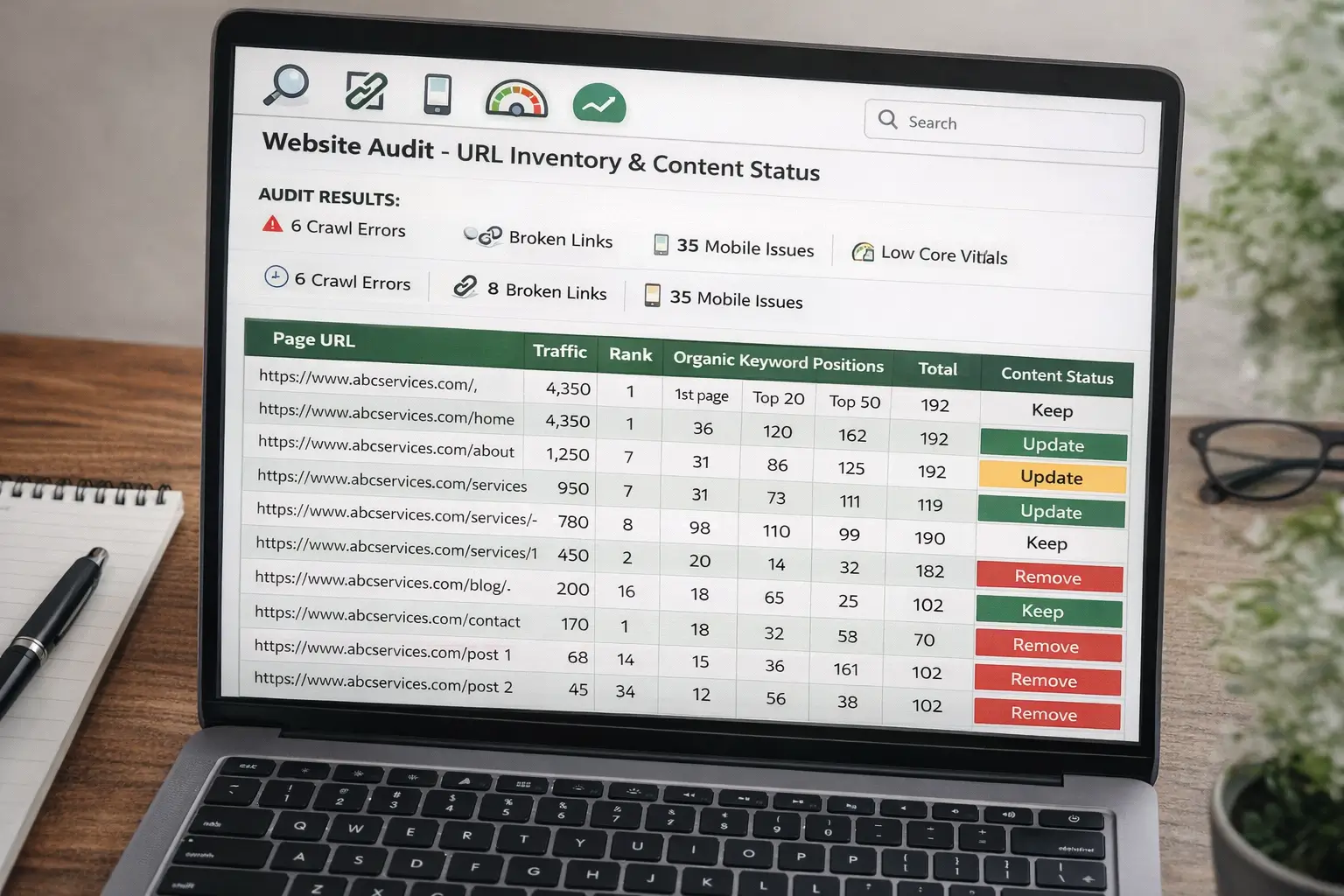
Crawl your existing site using a tool such as Screaming Frog or Ahrefs. Document every URL along with its title tag, meta description, inbound internal links, and current organic ranking positions. This becomes your preservation list. Any URL generating organic traffic must either be retained in the new build or 301 redirected correctly to its new equivalent.
2. Analytics Audit
Pull 12 months of data from Google Analytics or your analytics platform of choice. Identify your top ten pages by organic traffic, your highest-converting pages, and your worst-performing pages. This tells you precisely where to invest redesign effort and where the current site is already working well.
3. Content Audit
Review every page and assess its purpose, quality, and alignment with your current business offering. Tag each piece of content as one of: keep, update, consolidate, or remove. A content audit often reveals a site that is far larger than anyone realised, with outdated service pages, duplicate content, and orphaned blog posts that have never attracted a visitor.
4. Technical Audit
Check site speed, mobile usability, Core Web Vitals scores, crawl errors, and broken links. Note any structural issues that will need to be resolved in the redesign, as these rarely fix themselves if carried into a new build.
The output from this step is a spreadsheet containing every URL, its current traffic data, organic ranking positions, and content status decision. This document becomes one of the most important assets throughout the entire project.
Step 2: Define Clear Redesign Goals and KPIs
A redesign without defined goals is a redesign without a success measure. The most dangerous phrase in any redesign project is: "we want it to look more modern." That is an aesthetic preference, not a business goal. Without measurable targets you have no way of knowing whether the redesign worked, and no basis for making decisions when conflicting opinions arise during the project.
Before briefing any design agency or starting any internal work, define what success looks like in concrete, measurable terms.
| Redesign Goal | Measurable KPI | Review Timeframe |
|---|---|---|
| Increase enquiries | Contact form submissions per month | 3 months post-launch |
| Improve lead quality | Qualified lead rate from website | 6 months post-launch |
| Preserve SEO visibility | Organic traffic vs. pre-launch baseline | 1 month post-launch |
| Improve mobile experience | Mobile bounce rate and Core Web Vitals score | Launch day plus 30 days |
| Reduce support queries | Volume of FAQ-type emails or calls received | 3 months post-launch |
| Increase engagement | Average session duration (Google Analytics) | 3 months post-launch |
Set three to five primary goals and tie each one to a baseline metric measured before the redesign begins. This protects you from scope creep and gives your design and development team a clear brief to work towards, rather than subjective feedback loops driven by personal taste.
Critically, surface stakeholder goals at this stage too. Different people in your organisation may want different things from the redesign. A sales director may prioritise lead volume. A marketing manager may focus on SEO visibility. A director may be concerned primarily with brand perception. Aligning these priorities early prevents conflicting revision requests mid-project that stall progress and inflate budgets.
Step 3: Research Your Users and Competition
Good redesign decisions are grounded in evidence, not preference. User research and competitor analysis are not extras reserved for large enterprise projects. They are the foundation of a website that genuinely connects with the people you want to reach.
User Research
If you have existing customers, speak to three to five of them directly. Ask how they found you, what made them trust you enough to make contact, and what nearly stopped them from getting in touch. Their language will tell you exactly what to put in your headlines. Their hesitations will tell you what objections to address on your service pages.
Supplement conversations with behavioural data. Use a heatmap tool such as Hotjar to see where users are clicking, scrolling, and dropping off on your current site. This shows you how real visitors behave rather than how you assume they behave. The two are often quite different.
Competitor Analysis
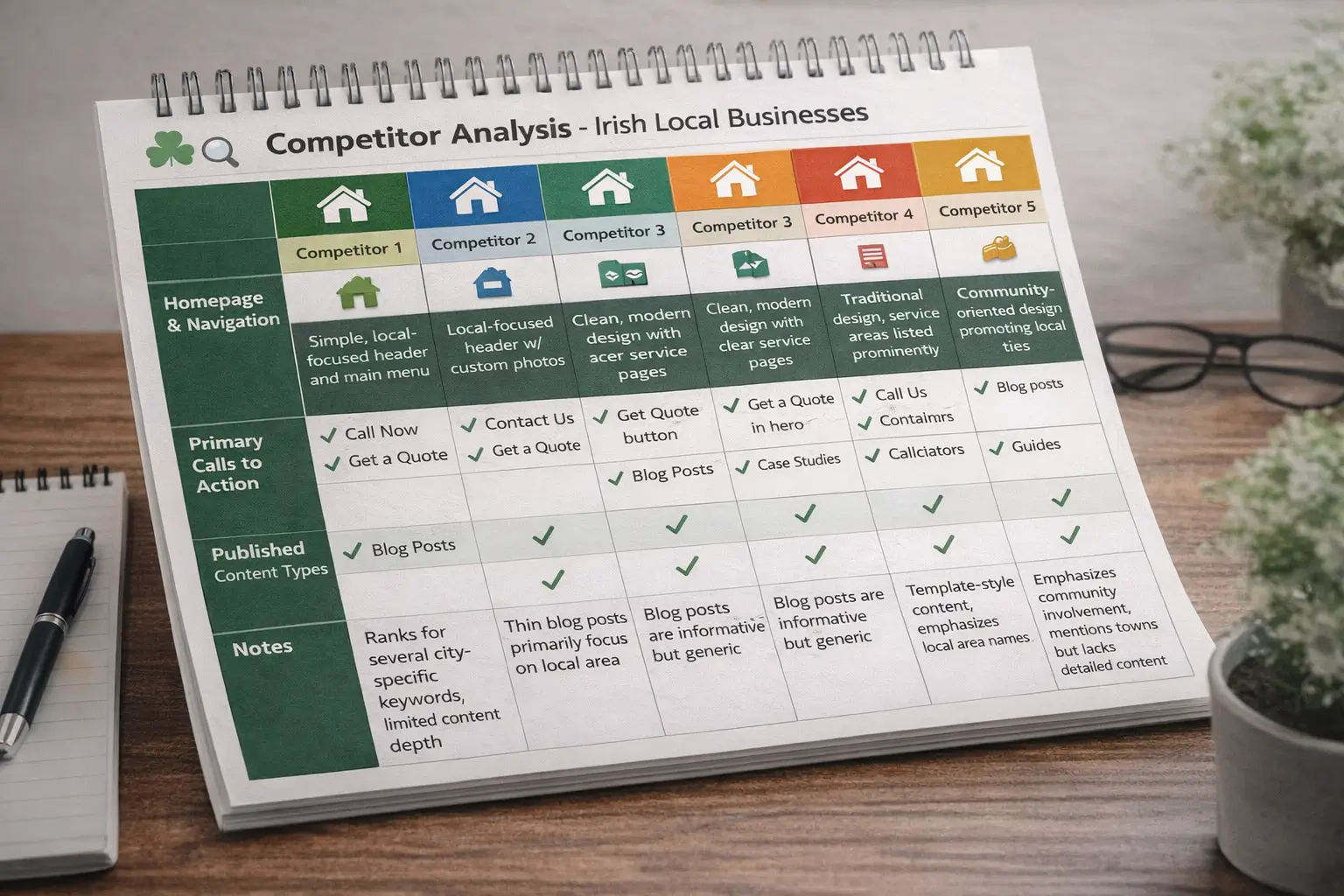
Identify three to five competitors who rank well for your target keywords and work through each one systematically. For each competitor, note:
- How they structure their homepage and primary navigation
- What their primary calls to action are and where they are placed
- What content types they publish: blogs, case studies, calculators, guides
- Where their content is thin, generic, or clearly templated (this is your opportunity)
You are not looking to imitate competitors. You are identifying patterns that Google is rewarding in your sector and finding the gaps you can fill more effectively.
For Irish businesses, this analysis often reveals that local competitors are ranking primarily on geographic relevance rather than content quality or depth. That is encouraging news for any business prepared to invest in a stronger content strategy alongside the redesign.
Step 4: Build Your Redesign Strategy and Roadmap
With your audit complete, your goals defined, and your user and competitor research gathered, you have everything you need to build the actual website redesign plan. This is the governing document for every decision from this point through to launch.
Your redesign strategy should address six core elements:
1. Scope Definition
Document precisely what is included in the redesign: which pages are being rebuilt, which are being retired, and what new functionality is required. A booking system, client portal, and ecommerce capability each carry different development implications. Scope creep is the primary driver of budget overruns on redesign projects. Define scope once, document it clearly, and manage changes formally from that point forward.
2. Platform Decision
Decide whether you are staying on your current platform or migrating to a new one. Platform migration adds significant complexity, particularly for SEO preservation. If you are switching platforms, factor in dedicated migration testing time and a thorough redirect mapping exercise.
3. Content Strategy
Determine which existing content you are keeping, which is being rewritten, and what new pages are needed. A keyword gap analysis against your current rankings will surface content opportunities you can address as part of the redesign.
4. Information Architecture
Map out the new navigation and page structure before any visual design work begins. Changes to the site structure after design has started are expensive to implement and create inconsistencies across the design system.
5. Timeline and Milestones
A realistic website redesign timeline for a small to mid-size business website runs between eight and sixteen weeks depending on scope, content complexity, and stakeholder availability. Build in a 15 to 20% buffer on your schedule. Content delivery delays are the most common cause of project overruns, and they are almost always underestimated at the outset.
6. Stakeholder Sign-Off Process
Agree in advance who holds approval authority at each stage of the project. Undefined approval chains produce conflicting feedback, repeated revision rounds, and avoidable launch delays. One named decision-maker per stakeholder group is sufficient and far more effective than committee review at every milestone.
If you are working with a professional agency, the strategy phase is where strong project foundations are either established or missed. Our web design services begin with a structured discovery and strategy session that establishes this framework before any design work commences.
Planning a Redesign? Start With a Strategy Session
We help Irish businesses plan and deliver websites that generate real results. Free consultation. No obligation. Straight answers.
Step 5: Plan Your Information Architecture and Wireframes
Information architecture (IA) is the way your website is organised and how visitors navigate through it. Before any designer opens a design tool, the IA should be agreed and signed off by all key stakeholders. Changing the IA after visual design has begun is like altering a floor plan after the walls are up. It is possible, but costly and disruptive.
Start With a Site Map
List every page in the new site and group them into primary and secondary navigation categories. For most small to mid-size business websites, the primary navigation should contain no more than six items. Beyond that, decision fatigue begins working against the user and conversion rates decline.
Create Wireframes for Key Pages
Wireframes are low-fidelity page layouts that define the structure of each key page without colour, imagery, or branding. They show where the headline sits, where the CTA is placed, how testimonials are incorporated, and how content is prioritised as the user scrolls.
Wireframes serve two purposes. They allow you to evaluate user flows and page logic before committing to visual design, and they make stakeholder review conversations far more focused. People give better structural feedback on a wireframe than on a finished visual design, where subjective opinions about colours and fonts often overshadow the more important questions about layout and content hierarchy.
For a standard business website, wireframe the following pages at minimum:
- Homepage
- Each primary service page
- About page
- Contact page
- Blog index and individual article template
Map Primary User Flows
Alongside the IA, identify the two or three primary journeys a visitor should take through your site. The most common journey for a service business is: homepage, service page, contact. Every page on those critical paths should have a clear, obvious next step that moves the visitor forward.
Step 6: Design With Conversion in Mind
Design that looks polished but does not convert is expensive decoration. Conversion-focused design is not about compromising on aesthetics. It is about ensuring every visual and structural decision serves a specific user action, and that the aesthetic supports rather than distracts from that goal.
Above the Fold
The top section of your homepage and key service pages should answer three questions within three seconds of a visitor arriving: what you do, who you do it for, and what they should do next. A vague hero image with a clever tagline that says nothing specific is one of the most consistent conversion killers on Irish business websites.
CTA Placement
Include a primary call to action above the fold and a secondary one at the end of each key section. Use clear, action-oriented language: "Get a free quote", "Book a consultation", "See our recent projects." Avoid vague CTAs such as "Learn more" or "Find out more", which tell the visitor nothing about what happens next.
Trust Signals
Place testimonials, case studies, accreditations, and client logos on service pages, not only on a dedicated testimonials page. Users make trust decisions on every page they visit, not just after navigating to a separate social proof section. The closer trust signals sit to a CTA, the more effectively they support conversion.
Mobile-First Thinking
Design for mobile devices first, then scale up to desktop. Over 60% of website traffic in Ireland now comes from mobile. A design that looks strong on desktop but creates friction on a small screen is optimising for the smaller portion of your audience.
Fictional Case Example: Clonlara Consulting, a two-director HR consultancy in Clare, launched a redesigned website that the team was proud of. The visual design was well-received internally. However, six months post-launch, enquiries had not increased. A follow-up conversion review found that the primary contact CTA was below the fold on mobile, the service pages contained no testimonials or social proof, and the homepage hero answered none of the three key visitor questions. Structural changes implemented eight weeks later produced a measurable uplift in contact form submissions without touching the visual design at all.
Step 7: Technical Planning and SEO Preservation
Losing organic search visibility in a website redesign is not inevitable. It is consistently the result of poor technical planning. Businesses that treat SEO preservation as an afterthought frequently spend six to twelve months recovering rankings that took years to build. The more traffic your current site generates, the higher the stakes.
URL Structure and Redirect Planning
If your URL structure is changing in the redesign (common when migrating platforms or restructuring navigation), every changed URL requires a 301 redirect to its new equivalent. Not a 302. Not a blanket redirect to the homepage. A specific, targeted 301 from the exact old URL to its exact new equivalent.
Use the URL inventory built during your audit to create a redirect mapping document before development begins. This document should be reviewed and tested by both the development team and an SEO specialist before the site goes live.
On-Page SEO Carry-Over
Every page needs its title tag, meta description, H1, and canonical URL reviewed and confirmed in the new build. Do not assume this is handled automatically. Add explicit SEO checks to your launch QA checklist and verify each one before the site goes live.
Core Web Vitals
Test your new site against Google's Core Web Vitals before launch, not after. Key metrics to target: Largest Contentful Paint under 2.5 seconds, Cumulative Layout Shift under 0.1, and Interaction to Next Paint under 200 milliseconds.
Post-Launch SEO Monitoring Checklist
- URL inventory completed and redirect map built and tested before launch
- All 301 redirects confirmed live and functional on launch day
- Title tags and meta descriptions carried across or intentionally rewritten
- New XML sitemap submitted to Google Search Console on launch day
- Organic traffic monitored daily for the first 14 days post-launch
- 404 errors identified and resolved within 48 hours of launch
Step 8: Project Timeline, Budget, and Team Structure
Unrealistic timelines are one of the leading causes of poor redesign outcomes. Compressed schedules force shortcuts on the elements that matter most: content quality, QA testing, and stakeholder review. Here is an honest breakdown of what a well-managed website redesign actually involves.
Typical Timeline for a Small to Mid-Size Business Website
- Discovery and strategy: 1 to 2 weeks
- Information architecture and wireframes: 1 to 2 weeks
- Design concepts and stakeholder approval: 2 to 3 weeks
- Content preparation (runs concurrently throughout): client-dependent
- Development and build: 3 to 5 weeks
- QA testing and revisions: 1 to 2 weeks
- Launch and post-launch monitoring: 1 week ongoing
Total range: 8 to 16 weeks for a standard business website. Add 20 to 30% buffer time on any project heavily reliant on client-supplied content, since content delays are the most consistent cause of extended project timelines.
Budget Considerations
For a professionally designed and developed business website in Ireland, a realistic investment sits between €15,00 and €8,000 depending on scope, platform choice, and the volume of custom functionality required. Ecommerce projects and web applications sit higher. Agencies offering full redesigns at significantly lower price points are almost always cutting development time, QA, or strategic planning. The cost of recovering from a poorly executed redesign typically exceeds the saving made by choosing the cheapest option.
Team Structure
At minimum, a redesign project requires one named decision-maker on the client side, a project manager, a designer, and a developer. Larger projects benefit from a dedicated content strategist and an SEO specialist involved from the strategy phase, not retrofitted at the end.
Common Website Redesign Mistakes to Avoid
Redesigning Without an Audit
Starting a redesign without understanding your current site's organic performance is one of the most costly mistakes a business can make. Pages you believe are unimportant may be generating significant organic traffic and qualified leads. Always audit before you act, and build your redesign decisions on evidence rather than assumption.
Skipping the Redirect Map
This is the single most common cause of post-redesign traffic drops. When a URL changes and no 301 redirect is in place, every link, ranking, and authority signal attached to that URL disappears. Build your redirect map before development begins, test it before launch, and monitor 404 errors daily in the weeks after going live.
Allowing Scope to Expand Mid-Project
Redesign projects become problematic when stakeholders add requirements after the scope has been defined. New feature requests introduced mid-build increase cost, extend timelines, and introduce quality risks throughout the project. Manage all change requests formally and evaluate each one against its impact on budget, timeline, and existing work before agreeing to proceed.
Writing Content After Design Is Complete
Content should inform design decisions, not be retrofitted into a finished layout. When copy is written after design is finalised, you end up with headlines that do not communicate clearly, service pages that lack the depth needed to rank, and CTAs that sit in awkward positions because the layout was not built around them. Start content planning at the strategy phase, not after wireframes.
Not Testing on Real Devices Before Launch
Viewing a new website in a browser resize window is not adequate QA. Test every critical user journey on real mobile devices running both iOS and Android before launch. Pay particular attention to contact forms, navigation menus, and CTAs, as these are the elements where display issues are most likely to block conversions.
Ready to Redesign? Let's Build It Right First Time
Custom websites from €1,500. No hidden fees. SEO-ready. Delivered in weeks, not months. Talk to us before you commit to anything.
Redesign Launch and Post-Launch Monitoring
Launch day is not the end of the redesign project. It is the beginning of the most critical monitoring phase. A carefully managed launch followed by proactive post-launch oversight prevents minor issues from becoming significant problems that erode the value of your investment.
Launch Day Checklist
- All 301 redirects live and tested end-to-end
- New XML sitemap submitted to Google Search Console
- Analytics tracking verified and recording data correctly
- All contact forms tested from submission through to email delivery
- SSL certificate active on all pages
- Title tags, meta descriptions, and H1s reviewed across all key pages
- Full site crawl run to check for broken links and missing redirects
Post-Launch Monitoring: First 30 Days
Monitor organic traffic in Google Search Console daily for the first two weeks. A small, temporary dip is normal as Google recrawls and reindexes the updated site. A sustained decline of more than 15 to 20% over two or more consecutive weeks indicates a structural issue requiring immediate investigation.
Track conversion metrics from day one and compare them against your pre-redesign baseline. Contact form submissions, phone click-throughs, and any other defined conversion actions should all be measured against the benchmarks established before the project began.
Deploy a heatmap tool for the first 30 days post-launch. Real user behaviour on the new design will almost always surface something worth adjusting, whether that is a CTA placement, a navigation label, or a section of content that users are not engaging with as expected.
Next Steps: Getting Expert Help With Your Redesign
Planning a successful website redesign requires significant time, strategic expertise, and disciplined project coordination. Most business owners have core responsibilities that make it difficult to manage a redesign project to the standard it requires without support from people who have done it many times before.
If you are ready to begin planning your redesign, or you want an honest second opinion on your current website before committing to a full rebuild, we would be glad to help. At Web Wizard, we work with Irish businesses to plan and deliver websites that generate real commercial results, with a clear process from strategy through to launch and beyond.
Get in touch for a no-obligation conversation about your project. We will review your current site, discuss your goals, and give you a straight assessment of what a redesign would involve and what it would cost.