Introduction
If your ecommerce store is generating sales but your average order value feels stuck, the issue probably isn't your traffic. It's what happens after a customer adds something to their cart. Upselling and cross-selling on your ecommerce website are two of the most reliable ways to grow revenue without spending a single euro on extra advertising. Done right, they feel helpful rather than pushy - and that's the difference between a customer who spends more and a customer who leaves.
This guide covers what upselling and cross-selling actually mean, where and how to implement them on your store, which tools work best for Shopify and WooCommerce, and the mistakes that cause these tactics to backfire. Whether you're running a Shopify store selling Irish craft goods or a WooCommerce site in the fashion or supplements space, the same core principles apply.
What Upselling and Cross-Selling Actually Mean (and Why the Difference Matters)
Upselling and cross-selling are often used interchangeably, but they work differently and should be placed differently on your site. Understanding the distinction is the starting point for getting either one right.
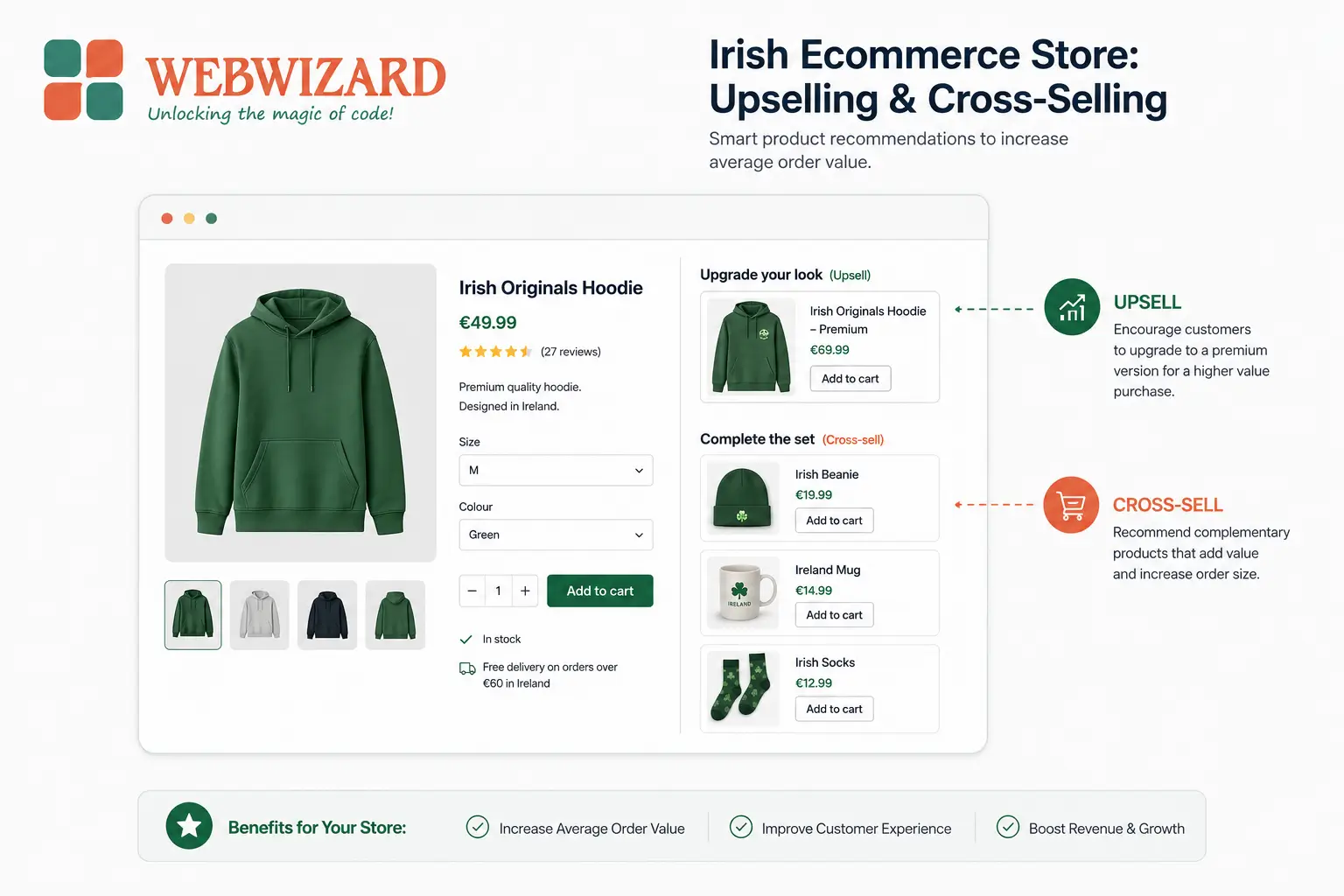
Upselling means encouraging the customer to buy a more expensive or upgraded version of the product they are already considering. If someone is looking at a 500g bag of coffee, showing them the 1kg bag at a better per-unit price is an upsell. If someone is buying a laptop, offering the model with more storage is an upsell. The goal is to increase the value of that single item in the basket.
Cross-selling means recommending a related but separate product that complements what the customer already intends to buy. The laptop buyer being shown a laptop bag, a mouse, or a screen cleaning kit is being cross-sold to. The customer buying the 1kg coffee bag being shown a cafetiere or a set of filters is being cross-sold to. You are adding items to the order, not upgrading the item itself.
Both tactics increase your average order value (AOV), but they target different decision points. Upselling works best at the product page stage, before the customer has committed. Cross-selling works well at the cart and checkout stage, when the customer has already decided to buy and is more open to additions. Confuse the two, and you end up placing the wrong offer in the wrong place, which converts poorly and annoys customers.
For Irish online stores, where the customer base tends to be relatively price-conscious and research-led, framing matters enormously. A well-placed upsell that genuinely saves the customer money or adds clear value will perform. A lazy "you might also like" carousel with no context will be ignored.
Where to Place Upsell and Cross-Sell Offers on Your Ecommerce Website
Placement is arguably more important than the offer itself. An excellent product recommendation shown at the wrong moment will be ignored. A decent recommendation shown at exactly the right moment will convert. There are five main locations to consider, and most stores use a combination of them.
Product Pages
This is the primary location for upselling. The customer is in consideration mode - they're reading descriptions, looking at images, and deciding. This is the moment to show them the upgraded version, the larger size, or the bundle that includes extras. The recommendation needs to be visible without scrolling on desktop, ideally positioned just below or beside the main product image and description. On mobile, it should appear below the add-to-cart button but above the full product description.
Keep the upsell tightly related to the product. If someone is looking at a €35 yoga mat, showing them a €55 version with better grip and a carrying strap is a sensible upsell. Showing them a protein powder because "other customers also bought this" is cross-selling and belongs somewhere else.
Cart Page
The cart page is the natural home for cross-selling. The customer has made their decision and is reviewing what they're about to buy. This is a low-friction moment to suggest one or two complementary items. Amazon's "Frequently Bought Together" section is the most recognised version of this. It works because it taps into social proof - other buyers made this combination, so it's probably a sensible pairing.
The key discipline here is restraint. Show one to three additional products, not eight. Overwhelm the cart page with suggestions and you risk increasing cart abandonment, which is the opposite of what you want. If you're looking to reduce abandonment and increase cart completions, a well-designed checkout experience is foundational - you can read more in our guide on reducing cart abandonment through ecommerce checkout design.
Checkout Page
The checkout page is not the place for aggressive upselling. The customer is completing a transaction. Interrupting that process with complex offers is a conversion killer. However, small, low-cost add-ons work well here - things like gift wrapping, extended warranties, or a single complementary product at a reduced price. The decision needs to be quick and low-effort. A checkbox or a one-click "Add to order" button is far more effective than a pop-up that requires the customer to leave the checkout flow.
Post-Purchase Pages and Emails
The order confirmation page is underused by most Irish ecommerce stores. At this point, the customer has already committed and there is no risk of losing the original sale. A post-purchase upsell - "Add this to your order before it ships" - can be surprisingly effective precisely because the anxiety of spending money has already passed. The customer is in a positive state of mind.
Post-purchase email sequences are another strong channel for cross-selling. A follow-up email sent three to five days after delivery, suggesting products that pair with what was purchased, will typically outperform a generic promotional email. It's relevant, it's personalised, and it arrives when the customer has already had a positive experience with the original product.
Homepage and Category Pages
Personalised product recommendations on the homepage ("Recommended for you" or "Trending this week") are more of a discovery tool than a direct upsell mechanism, but they serve the same end goal of increasing basket size over a session. Category pages can carry "Best sellers" or "Customers also viewed" sections that nudge browsers towards higher-value items without being intrusive.
Want an Ecommerce Store Built to Sell More?
We build Shopify and WooCommerce stores for Irish businesses with upsell, cross-sell, and conversion features built in from day one. Custom design starting at €1,500 | Free Consultation | No Hidden Fees.
How to Implement Upselling and Cross-Selling on Shopify
Shopify is the most widely used ecommerce platform among Irish small and medium businesses, and it has strong native support for product recommendations alongside a healthy app ecosystem for more advanced implementations.
At the basic level, Shopify's built-in "Product Recommendations" feature uses order history and browsing behaviour to automatically suggest related products. You can surface these on product pages and the cart page without any third-party apps. The recommendations are algorithmic and improve over time as your store builds transaction data, but in the early months when you have limited order history, they can feel generic.
For more control, the most commonly used Shopify apps for upselling and cross-selling include ReConvert (focused on post-purchase upsells and thank-you page customisation), Frequently Bought Together (which replicates the Amazon-style bundle suggestion), and Candy Rack (which handles one-click upsells on the product page). These apps typically cost between €8 and €30 per month, which is a modest investment if they're increasing your AOV by even a few euros per order.
One practical approach for stores that are new to this: start with the post-purchase page. It requires no changes to your main checkout flow, carries no risk of disrupting existing conversions, and gives you a clean test environment. Set up a simple post-purchase offer on your order confirmation page - ideally one product that costs 20% to 30% of the average order value - and measure the take rate over four weeks before expanding to other placements.
If you are building a new Shopify store or rethinking an existing one, our Shopify ecommerce development service covers the full build including product page structure, checkout flow, and revenue-optimised layouts from the start.
How to Implement Upselling and Cross-Selling on WooCommerce
WooCommerce, which powers a significant portion of Irish ecommerce sites built on WordPress, has upselling and cross-selling functionality built into its core product editor. When you edit any product in WooCommerce, there is a "Linked Products" tab where you can manually assign upsells (shown on the product page) and cross-sells (shown on the cart page). This native feature requires no plugin, costs nothing, and is completely within your control.
The limitation of the native approach is that it is entirely manual. You have to go into each product and assign the links yourself. For a store with 20 to 50 products, this is manageable. For a store with 200 products, it becomes time-consuming and easy to maintain inconsistently. In that case, a plugin like YITH WooCommerce Frequently Bought Together or CartFlows gives you more automated options and better presentation templates.
WooCommerce also integrates well with email marketing tools like Mailchimp and Klaviyo, which can trigger personalised post-purchase cross-sell sequences based on what was bought. Getting this set up takes a few hours initially but can run automatically thereafter, making it one of the best returns on a small investment of setup time for a WooCommerce store owner.
One thing that catches out many WooCommerce store owners: the upsell and cross-sell fields only work if the theme properly renders the linked products section. Some themes suppress this area or display it poorly on mobile. If you've added linked products and they're not appearing, the issue is almost always in the theme template, not WooCommerce itself. This is worth checking before assuming the feature isn't working.
Product Bundling as a Cross-Selling Strategy
Bundling deserves its own section because it's one of the most effective cross-selling tactics for Irish ecommerce stores and one of the most commonly done poorly. A bundle is a pre-packaged combination of products sold together at a slight discount compared to buying each item separately. The discount does not need to be large - five to fifteen percent is usually enough to tip the decision.
The reason bundling works is partly psychological. A bundle simplifies the decision. Instead of evaluating each product individually, the customer makes one decision: buy the bundle or don't. That framing reduces friction and increases the perceived value of the complete solution. A skincare brand selling a cleanser, a toner, and a moisturiser as a "starter routine" for €48 instead of €54 (the individual total) is not just offering a discount; it's removing the effort of working out what goes together.
For Irish stores selling in the gifting space - which is a significant ecommerce category here, particularly around Christmas, Mothers' Day, and Valentine's Day - bundles are particularly effective because they solve the gift buyer's core problem: what do I get? A pre-curated gift set with good packaging takes that decision away entirely.
When building bundles, keep the following in mind: the anchor product should be something the customer was likely to buy anyway; the add-on product should be genuinely complementary; and the bundle price should be visible alongside the individual item prices so the saving is obvious. A bundle where the saving is buried or unclear will not convert.
The Free Shipping Threshold: An Underrated AOV Tool
Strictly speaking, a free shipping threshold is neither an upsell nor a cross-sell, but it performs the same function: increasing the average amount a customer spends per order. If your average order value is €40 and you set your free shipping threshold at €55, a meaningful proportion of customers will add another item to reach that threshold rather than pay for shipping. The psychology is straightforward - paying for shipping feels like waste, while spending on a product feels like getting something.
The threshold needs to be set correctly. If it's too close to your AOV, too few customers will be motivated to add more. If it's too far above it, too few will bother. A threshold set at around 30% above your current AOV is a reasonable starting point to test. Always show the customer how close they are to qualifying - "You're €12 away from free delivery" in the cart is a nudge that works.
For Irish ecommerce stores delivering within Ireland, where standard courier rates from companies like An Post or DPD run from €4 to €8 for small parcels, the threshold gives you room to absorb that cost on larger orders while increasing what customers spend.
Comparison of Upselling and Cross-Selling Placement Options
| Placement | Best Tactic | Customer Stage | Conversion Risk | Recommended For |
|---|---|---|---|---|
| Product Page | Upselling | Consideration | Low | All store types |
| Cart Page | Cross-selling | Pre-purchase | Medium | Complementary product ranges |
| Checkout Page | Small add-ons only | Transaction | High if overused | Low-cost add-ons, gift wrap |
| Post-Purchase Page | Upselling / Cross-selling | Post-purchase | None (sale secured) | Stores with repeat-purchase products |
| Email Sequence | Cross-selling | Post-delivery | None | All store types |
| Homepage / Category | Product discovery | Browsing | Low | Larger catalogues |
Fictional Case Example: An Irish Health and Wellness Store
Fictional Case Example: Álainn Naturals, a small Irish health and wellness store based in Galway, was generating a steady volume of orders but had an average order value of just €32. The store owner noticed that most customers were buying single products - a magnesium supplement or a collagen powder - but rarely picking up related items. After setting up WooCommerce's linked products feature to pair each supplement with a related product (for example, linking the magnesium capsules to a sleep support tea and a B-vitamin complex), and creating a "Wellness Starter Bundle" at a 10% discount, the store saw its AOV climb to €46 over three months. The bundle accounted for a quarter of all orders placed during that period, mostly from new customers who appreciated the curated guidance around what products go together.
Comparing Website Designers? See Why We're Different
Custom Ecommerce Design Starting at €1,500 | No Hidden Fees | Free Consultation | SEO-ready ecommerce sites built for Irish businesses.
GDPR and Personalisation: What Irish Ecommerce Stores Need to Know
Personalised product recommendations - the kind that say "Based on what you've browsed" or "Because you bought X" - rely on tracking customer behaviour and purchase history. In Ireland and across the EU, this falls under GDPR, and it's worth understanding your obligations before implementing behavioural recommendation systems.
If you are personalising recommendations based on data collected from a specific customer's browsing or purchase history, that data processing must have a lawful basis. For existing customers, this is typically legitimate interest (you can argue that showing relevant products to someone who has shopped with you before is a reasonable expectation). For anonymous visitors, any tracking that links browsing behaviour to a profile generally requires explicit consent, which is why your cookie consent banner matters - and why dismissing it as a formality is a mistake.
Most Shopify and WooCommerce apps that handle recommendations process data within the app's own system and are broadly GDPR-compliant by design, but you should check the data processing agreement (DPA) for any third-party app you install. This is not just a legal checkbox - it's increasingly a trust signal for Irish consumers who are aware of data practices.
The practical implication is this: for anonymous visitors, keep recommendations based on general signals (best sellers, popular in this category) rather than individual browsing profiles. Save the personalised recommendations for logged-in customers or email sequences where you have a proper basis for using their data.
Common Mistakes That Make Upselling and Cross-Selling Backfire
Recommending Products That Are Not Actually Related
This is the most common failure. A "You might also like" section that serves random products from your catalogue based on loose associations is not cross-selling - it's noise. Customers can spot irrelevance instantly, and an irrelevant recommendation signals that the store doesn't understand what they need. Every recommendation should pass a simple test: would a knowledgeable shop assistant genuinely suggest this? If the answer is no, it should not appear.
Showing Too Many Options at Once
Decision fatigue is real. Showing eight cross-sell products on the cart page does not give customers more choice; it gives them a reason to skip the whole thing. Limit cart page recommendations to two or three products. On the product page, one clear upsell option will outperform four competing ones almost every time. More options is not better - more relevant options in smaller quantities is better.
Overloading the Checkout with Offers
The checkout page has one job: get the transaction completed. Any upsell or cross-sell placed on the checkout that adds friction - a pop-up that requires a decision, a multi-step upsell offer, anything that disrupts the payment flow - will cost you completed orders. If you want to use the checkout page for add-ons, keep it to a single checkbox or a one-click add. Never redirect the customer away from the checkout to view an upsell product.
Upselling to a Price Point the Customer Clearly Can't Justify
If a customer is buying a €15 product, upselling them to a €90 version is almost never going to work. The rule of thumb used by most ecommerce practitioners is that an upsell should cost no more than 25% to 40% above the original product price. Cross-sells should typically represent 10% to 20% of the original basket value. Beyond those ranges, the offer stops feeling like a helpful suggestion and starts feeling like a pressure tactic.
Never Testing or Updating the Recommendations
Upsell and cross-sell placements are not something you configure once and forget. Customer preferences change, stock changes, and what converts well in January may perform differently in October. Irish seasonal buying patterns - back-to-school in August, Christmas from late October, Valentine's Day, and St Patrick's Day in March - all shift what customers are looking for. Review your recommendations at least quarterly and before each major seasonal period.
How Much Revenue Can Upselling and Cross-Selling Actually Add?
The honest answer is: it varies significantly depending on your product category, your current AOV, how well the recommendations are implemented, and how much traffic your store processes. The figures commonly cited in the industry - that upselling and cross-selling can account for 10% to 35% of ecommerce revenue - are real but they reflect mature, well-optimised implementations, not a new store that has just added a "Frequently Bought Together" plugin.
A more realistic expectation for an Irish SME store implementing these tactics for the first time: a well-configured post-purchase upsell might achieve a take rate of 5% to 15%, meaning 5 to 15 out of every 100 customers accept the additional offer. On cart page cross-sells, a 3% to 8% take rate is a reasonable benchmark to aim for in the first few months.
What those percentages mean in practice depends entirely on your order volume and your product margins. If you're processing 200 orders per month and increasing your AOV by €8 per order across 10% of transactions, that's an additional €160 per month from a change that costs you nothing in extra advertising spend. Scale that over a year, across multiple placements, and the cumulative effect becomes significant for a small Irish online store.
The point is not to expect a dramatic overnight transformation. These are compounding gains - each improvement to placement, relevance, and timing compounds over time and order volume. Stores that approach upselling and cross-selling as an ongoing optimisation process, rather than a one-time setup, consistently see the better results.
For a broader view of how to grow revenue without increasing your ad spend, the guide on conversion rate optimisation for ecommerce covers complementary tactics that work well alongside upselling and cross-selling. Similarly, if your product descriptions are not doing their job in the first place, upsells and cross-sells will underperform - strong copy matters at every stage of the funnel, and our guide on writing product descriptions that rank and convert covers that in detail.
Getting Your Ecommerce Store Set Up to Grow Revenue Per Order
Upselling and cross-selling are not silver bullets, but they are among the most cost-effective revenue levers available to any Irish ecommerce store. The fundamentals are straightforward: place the right recommendation in the right location at the right stage of the customer journey, keep the suggestions relevant and restrained, and test what works for your specific product range and customer base.
The stores that see the best results are those that treat this as an ongoing process rather than a one-time configuration. Start with one placement, measure the take rate, refine the product pairings, and expand from there. Whether you're on Shopify or WooCommerce, the tools are accessible and the investment required is minimal compared to the potential return.
If your store's product pages, cart experience, or checkout flow are not currently structured to support these tactics - or if you want to build a new ecommerce store with revenue optimisation built in from the start - take a look at what we offer through our ecommerce website design service. And if you're exploring how a well-designed store supports higher conversions at every stage of the funnel, our guide on how to design an ecommerce website that actually converts is a practical companion to this one.
If you'd like to discuss how to improve the revenue performance of your existing online store, get in touch with Web Wizard for a straightforward conversation about what your store needs.