Introduction
Most WooCommerce tutorials are written with a US store in mind. Default currency set to dollars, tax rules pointing at American rates, and shipping zones configured for domestic US delivery. If you are setting up an online store in Ireland, you are going to spend a frustrating amount of time undoing those defaults and searching for Irish-specific guidance that most generic guides never cover.
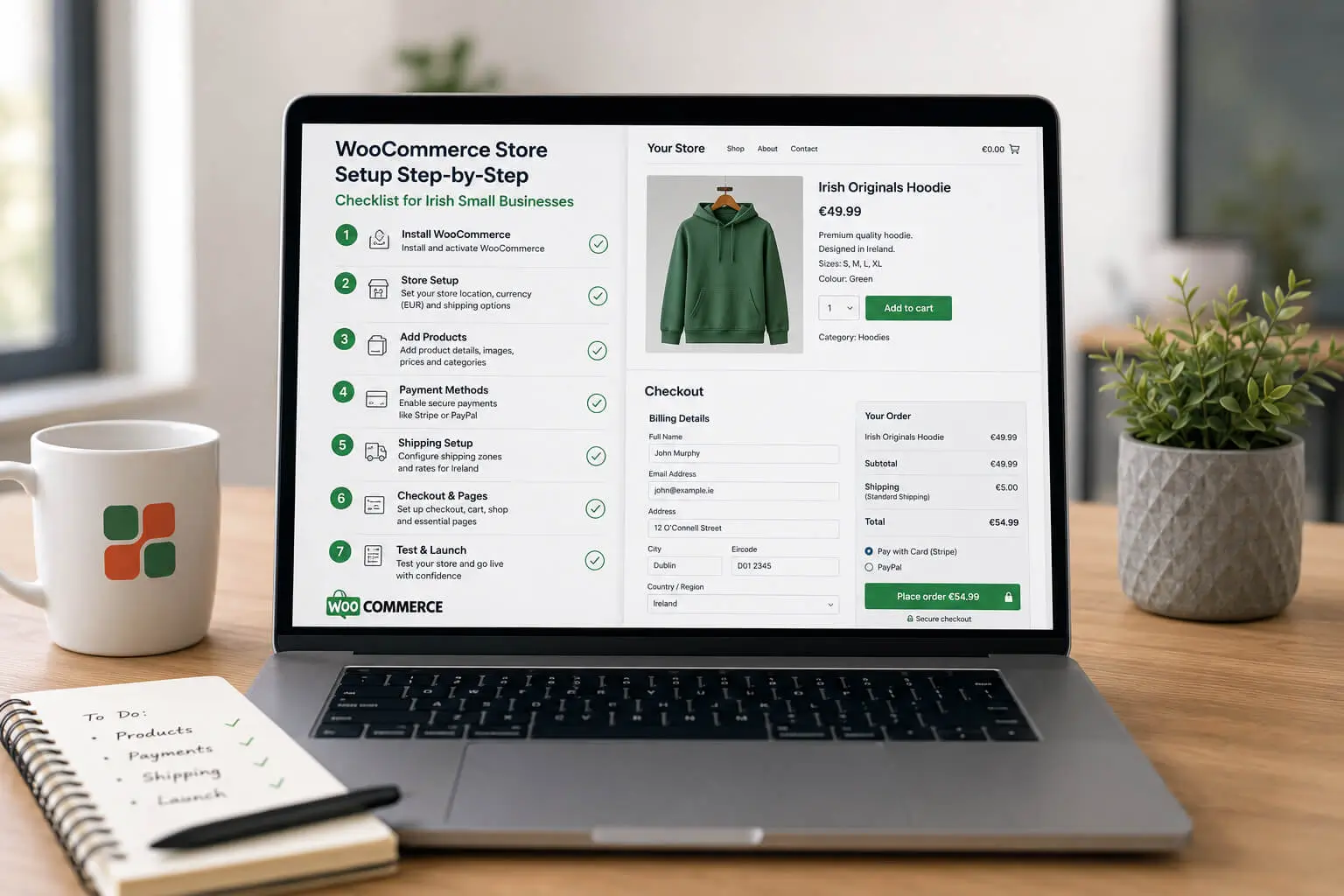
This step-by-step WooCommerce store setup checklist covers the full process from the beginning, with every configuration that matters for an Irish business: Euro pricing with VAT-inclusive display, Irish tax rates, Stripe setup with EU Strong Customer Authentication, An Post shipping zones, GDPR cookie consent, and a pre-launch testing checklist that mirrors what a professional store build covers before going live. Work through it in order and your store will be properly configured before your first customer ever sees it.
If you are still deciding whether WooCommerce is the right platform or are weighing it up against Shopify, our guide on how to design an ecommerce website that converts covers the platform decision in detail before you commit to either.
Why WooCommerce Is Worth Serious Consideration for Irish Small Businesses
WooCommerce is a free WordPress plugin that turns any WordPress site into a fully functional online store. It powers roughly a third of all ecommerce websites globally, and for Irish small businesses in particular, the cost model is one of its most compelling features. There is no monthly platform fee. You pay for hosting and a domain, and those costs are fixed regardless of how many products you sell or how much revenue you generate. Compare that to Shopify, which charges between €35 and €360 per month depending on your plan, and the difference compounds meaningfully over a few years of trading.
The second advantage is content flexibility. WooCommerce runs on WordPress, which means your store and your content marketing sit in the same system. If your business benefits from buying guides, product tutorials, or local SEO content targeting searches like "handmade jewellery Cork" or "organic skincare Ireland", the WordPress and WooCommerce combination handles that far more naturally than Shopify's blogging tools. For businesses where SEO is a meaningful part of the growth strategy, this is a genuine practical advantage.
The honest trade-off is that WooCommerce requires more hands-on management than a fully hosted platform. You are responsible for hosting quality, plugin updates, security patches, and performance in a way that Shopify handles automatically. That is not a reason to avoid it, but it is a reason to set it up carefully from the start. Our WordPress website design service covers WooCommerce builds for Irish businesses who want the platform's flexibility without the configuration risks of a DIY build.
For a direct side-by-side comparison of both platforms, including costs, SEO capabilities, and which suits different Irish business types, see our ecommerce website design Ireland page which covers both Shopify and WooCommerce in detail.
Before You Install WooCommerce: What You Need in Place First
WooCommerce is a WordPress plugin, not a standalone platform. Before you install it, you need a self-hosted WordPress site running on proper web hosting. This is where many Irish small businesses make their first and most consequential mistake: choosing the cheapest shared hosting available, installing WordPress, and then wondering why their store loads slowly. Slow stores lose sales. A product page that takes more than three seconds to load on mobile will lose more than half of its visitors before it finishes loading.
For an Irish ecommerce store, choose a hosting provider that offers PHP 8.1 or higher, SSD storage, and servers located in Europe. Bluehost, SiteGround, and Kinsta all perform reliably for WooCommerce stores. Budget between €12 and €30 per month for a plan that will support a live store without performance problems. That monthly cost is not optional overhead; it is an investment in your checkout completion rate.
You also need an SSL certificate installed and active before you touch payment settings. An SSL certificate encrypts data between your store and your customers, displays the padlock icon in the browser, and is a hard requirement for every payment gateway. Most reputable hosting providers include a free SSL via Let's Encrypt. Activate it, then verify every page on your site loads over HTTPS before configuring payments. Our guide to SSL certificates for Irish business websites explains exactly what to check and how to confirm it is working correctly across your whole store.
Finally, have your product information, pricing, and photography prepared before you start building. Uploading placeholder content to test things and replacing it later results in duplicate URLs, indexing issues, and product pages that have already been crawled by Google with incomplete content.
Want Your WooCommerce Store Built Correctly from Day One?
Custom WooCommerce Builds from €2,500 | Irish VAT Configured | Stripe & PayPal Setup | Live in 4–6 Weeks
How to Set Up WooCommerce: Installation and Initial Configuration
Setting up a WooCommerce store follows a clear sequence: install the plugin, run the setup wizard, configure your store details (currency, address, and VAT), add your products, configure payments and shipping, install essential plugins, and test the full checkout before going live. Skip stages or reverse the order and you create problems that are time-consuming to unpick later.
Step 1: Install and Activate the WooCommerce Plugin
From your WordPress dashboard, navigate to Plugins, then Add New, and search for WooCommerce. Install the free plugin published by Automattic, then click Activate. WooCommerce will immediately prompt you to run the Onboarding Wizard. Work through it rather than closing it. The wizard creates your essential store pages automatically: Shop, Cart, Checkout, My Account, and Order Confirmation. These pages have specific shortcodes that WooCommerce needs to function. Recreating them manually later is unnecessary extra work and a common source of checkout errors.
Step 2: Configure Your Store Details
In WooCommerce, go to Settings, then the General tab. Set your store address to your Irish business address. Set your selling location to Ireland. Set your currency to Euro (€). Review the currency position setting: Euro is typically displayed as €50.00 rather than 50.00€, and Irish customers will notice when this looks wrong. While you are in General settings, set your base location correctly, as this affects how WooCommerce calculates default tax rates and shipping zones.
Step 3: Configure Irish VAT in WooCommerce
This is the setting most self-built Irish WooCommerce stores get wrong, and it directly costs sales. In WooCommerce Settings, click the Tax tab and enable taxes. Set the option "prices entered with tax" to "yes, I will enter prices inclusive of tax". Under Irish consumer protection rules, prices displayed to consumers must include VAT. Showing prices excluding VAT and adding 23% at checkout is non-compliant and is one of the leading causes of cart abandonment, because customers see their total increase unexpectedly at the payment step.
Under Tax Rates, create an entry for Ireland with a rate of 23% for standard-rated goods. If you sell products at the reduced rate of 13.5% (which applies to certain food service items, building services, and some other categories), create a separate tax class for those products. If you sell across the EU and your cross-border B2C sales exceed the thresholds under the EU One Stop Shop scheme, you will need additional tax entries per destination country. Revenue Ireland's website has current guidance on the applicable thresholds.
Setting Up Payments for an Irish WooCommerce Store
Stripe is the payment gateway to configure first. It supports Visa, Mastercard, American Express, Apple Pay, Google Pay, and 3D Secure 2 (3DS2) authentication. That last point matters specifically for Irish stores: 3DS2 is required under EU Strong Customer Authentication regulations, which apply to all European Economic Area card transactions. Without it enabled, your checkout will reject a proportion of card payments from Irish and EU customers. Some stores have launched without 3DS2 active and quietly lost sales without understanding why.
Install the official Stripe WooCommerce plugin, connect it to your Stripe account, and enable Apple Pay and Google Pay within the Stripe settings. Both are available at no additional cost as part of the standard integration. Apple Pay adoption in Ireland is among the highest in Europe due to iPhone market share. Not offering one-tap checkout on mobile is a meaningful conversion gap that Stripe closes for you without any additional development work. You can also read our guide on how to secure online transactions with WordPress for a broader look at payment security for WooCommerce stores.
PayPal is worth adding as a secondary option. A segment of Irish shoppers, particularly those buying from a brand they are unfamiliar with for the first time, prefer PayPal because it means they do not need to enter card details directly with a new merchant. Add the PayPal WooCommerce plugin and configure both Stripe and PayPal to use the same order confirmation page so post-payment confirmation is consistent regardless of which method the customer used.
If your average order value is above €80 to €100, consider adding a buy-now-pay-later option such as Klarna. BNPL availability consistently increases basket size for mid-to-high value purchases because it removes the psychological barrier of a large upfront payment. Our guide to reducing cart abandonment at checkout covers payment options in more detail, including the combinations that work best for Irish consumer behaviour.
Configuring Shipping and Checkout for Irish Customers
WooCommerce shipping zones let you set different rates for different destination regions. For an Irish store, configure three zones at minimum: Ireland, United Kingdom, and European Union. Post-Brexit, UK deliveries are treated as international shipments for customs purposes. Customers in Great Britain and Northern Ireland may face additional charges that you need to communicate clearly at the cart and checkout stage, not at the point of delivery. Discovering unexpected customs costs upon arrival is a fast route to a return request and a negative review.
For Irish domestic shipping, configure your An Post or courier rates as flat-rate or weight-based options within the Ireland zone. If you offer free shipping above a threshold, typically somewhere between €40 and €60 works for most Irish product categories, set this within the Ireland zone specifically rather than applying it globally. Free domestic shipping with a qualifying spend is one of the most effective ways to increase average order value without discounting your products.
In WooCommerce Settings under Accounts and Privacy, turn off the forced account creation requirement. Enable guest checkout. This is not a minor detail. Forcing a first-time customer to register before completing a purchase is the second-leading cause of cart abandonment across Irish ecommerce stores. Guest checkout should be the default path, with account creation offered as an optional step after the order is confirmed.
Essential WooCommerce Plugins for Irish Stores (and What to Skip)
Plugin choice is where most self-built WooCommerce stores start to create problems for themselves. Every plugin adds load to your server and introduces a potential conflict or security risk. The goal is the smallest set of plugins that covers your genuine requirements, not the largest feature set you might eventually use. A new WooCommerce store needs payment processing, SEO, security, performance caching, GDPR consent management, image optimisation, and backups. That is seven plugin categories. Everything else should wait until you have a specific need for it.
| Plugin Category | Recommended Option | Why It Matters for Irish Stores |
|---|---|---|
| Payments | WooCommerce Stripe Plugin | Stripe with Apple Pay, Google Pay, and 3DS2 support. Required for EU SCA compliance. |
| SEO | Yoast SEO or Rank Math | Manages meta titles, descriptions, schema markup, and XML sitemaps from day one. |
| GDPR / Cookie Consent | CookieYes or Complianz | Required by Irish and EU law. Must block non-essential cookies before consent is given. |
| Performance / Caching | WP Rocket or LiteSpeed Cache | Caching and deferred script loading reduce page load times on product and checkout pages. |
| Security | Wordfence or Solid Security | Firewall and malware scanning. WordPress stores are regularly targeted without basic protection. |
| Image Optimisation | ShortPixel or Imagify | Compresses product images without visible quality loss. Direct impact on page load speed. |
| Backups | UpdraftPlus | Automated off-site backups. You will be grateful for this when something eventually goes wrong. |
What to avoid: page builder plugins that generate excessive code bloat on product pages, duplicate-functionality plugins (if Stripe handles payments, you do not need three additional payment plugins installed and inactive), and anything with no updates in the past six months. Outdated plugins are the leading cause of WordPress security incidents. Our post on what happens when you do not update WordPress plugins covers the real consequences of this in detail, including how quickly an unpatched plugin becomes a liability.
For image-heavy stores, read our guide on website image optimisation for Irish businesses. Product photography is one of the heaviest assets on any ecommerce site, and optimising it correctly before launch is far less disruptive than fixing it after the store is live.
Prefer to Skip the Setup Headaches Entirely?
SEO-ready WooCommerce stores for Irish businesses | GDPR compliant | Stripe configured | Mobile-first checkout | Live in 4–6 weeks
Mobile Performance and Speed Optimisation Before Launch
More than 60% of ecommerce traffic in Ireland arrives on mobile devices. A store that looks clean on desktop but runs poorly on a phone will lose the majority of its visitors before they reach the checkout. Test your store on an actual device, not just a browser emulator in responsive mode. The checkout flow, in particular, behaves differently on iOS and Android than it does in a desktop preview. Button tap targets, keyboard behaviour on form fields, and the payment confirmation screen all deserve a full walkthrough on a real handset.
Run your homepage, a product page, and your checkout page through Google PageSpeed Insights before launch and fix any critical issues. The most common performance problems on newly built WooCommerce stores are unoptimised product images, too many active plugins loading scripts on every page, and underpowered hosting. The first two are straightforward to fix before launch. The third is a hosting decision that is much easier to get right at the setup stage than to migrate after you are live with customers and orders.
Our detailed guide on how to speed up a WordPress website covers the specific interventions that make the biggest difference to WooCommerce stores, including image handling, caching configuration, and the scripts most likely to slow your checkout.
[IMAGE: Google PageSpeed Insights results for a WooCommerce store showing mobile performance score for an Irish ecommerce site]
Pre-Launch Checklist: 12 Things to Verify Before Your WooCommerce Store Goes Live
A structured pre-launch check is the difference between a store that opens correctly and one that loses its first customers to configuration errors. Work through every item below before pointing your live domain at the store. None of these should be left until after launch.
| Check | What to Verify |
|---|---|
| SSL certificate | Padlock visible in browser. Every page redirects from HTTP to HTTPS automatically. |
| Payment test | Complete a test purchase using Stripe's test card numbers. Confirm the order confirmation email triggers correctly. |
| Irish VAT display | All product prices show VAT-inclusive. Correct rate applied at checkout. No price increase between cart and checkout. |
| Shipping rates | Ireland, UK, and EU zones are configured. Delivery costs are visible on the cart page, before the payment step. |
| Guest checkout | A customer can complete a purchase from product page to order confirmation without creating an account. |
| Mobile checkout | Complete a full purchase on an iPhone and an Android device. Check every form field and button behaves correctly. |
| Order confirmation email | Customer receives a clear confirmation email with itemised order details and expected delivery timeframe. |
| GDPR cookie consent | Cookie banner blocks all non-essential cookies until the visitor actively consents. Not a passive notice. |
| Privacy policy | Privacy policy page exists and is linked from the footer and from the checkout page. |
| Out-of-stock handling | Products display as out of stock when inventory hits zero. Customers cannot purchase unavailable items. |
| Product image quality | All images are optimised, load in under two seconds, and display correctly on mobile screen sizes. |
| Google Analytics 4 | GA4 is connected. Ecommerce purchase tracking is configured. A test purchase appears in GA4 conversion reports. |
Common WooCommerce Setup Mistakes Irish Businesses Make
These errors appear repeatedly across self-built Irish WooCommerce stores. Each one has a measurable negative effect on sales, compliance, or both.
Mistake 1: Choosing the Cheapest Hosting Available
Budget shared hosting providers oversell their server capacity. Your WooCommerce store shares resources with hundreds of other sites, and during traffic spikes, your page load times suffer. WooCommerce is more resource-intensive than a standard WordPress site because it processes real-time inventory checks, cart data, and payment transactions simultaneously. A managed WordPress hosting plan at €15 to €25 per month is not an optional upgrade. It is the foundation your store's conversion rate depends on. Launching on inadequate hosting and migrating later disrupts a live store with customers and orders already in the system.
Mistake 2: Displaying Prices Excluding VAT
Showing ex-VAT prices on product pages and adding 23% at checkout is the most common Irish WooCommerce setup error, and it is both a legal and commercial problem. Under the Consumer Rights Act 2022, prices shown to Irish consumers must include all applicable taxes. Beyond compliance, displaying a lower price on the product page and a higher total at checkout is the single biggest driver of cart abandonment. Customers feel misled even if they understand it is a tax display issue. Configure WooCommerce to store and show prices inclusive of VAT from the beginning, not as a post-launch correction.
Mistake 3: Ignoring GDPR Cookie Consent
Every Irish ecommerce website must obtain explicit, informed consent before setting non-essential cookies. Analytics cookies, Stripe tracking pixels, Google Tag Manager scripts, and Meta retargeting all count as non-essential and cannot load until the visitor consents. A notice bar that says "we use cookies" and assumes acceptance by continued browsing does not meet the standard set by the Irish Data Protection Commission. This is not a grey area; it is an area where getting it wrong creates genuine legal exposure. A properly configured consent tool like CookieYes takes less than an hour to set up correctly.
Mistake 4: Installing Too Many Plugins
The WooCommerce plugin directory has thousands of extensions, and the temptation to install everything that looks useful creates a slow, fragile store that is difficult to maintain. Every plugin adds a performance cost and a potential security vulnerability. The seven plugin categories covered earlier in this guide are what a new store needs. Everything else is a decision to make once you have a specific, confirmed need. Installing features speculatively and leaving unused plugins active on a live store is one of the most common reasons WooCommerce stores get hacked or underperform on speed tests.
Mistake 5: Not Testing Mobile Checkout as a Real Customer
Developers and business owners test their stores on desktop browsers. Customers shop on actual phones. The behaviour of form fields, touch targets, dropdown menus, and the payment confirmation sequence on a real device is often quite different from what a desktop responsive preview shows. Test the complete purchase journey on your own iPhone and Android before launch. Note every moment of friction. Then ask someone who has never seen the store to do the same, because you already know where things are and they do not. This test catches more real problems than any automated checker.
Fictional Case Example: Getting the Setup Right Before Launch
Fictional Case Example: Brennan's Outdoor Gear, a fictional small Irish business in Roscommon selling hiking and camping equipment, launched their self-built WooCommerce store after following a US-based tutorial. Their VAT was configured to display ex-VAT prices, adding 23% at the checkout summary. Guest checkout was disabled. Their hosting plan cost €3.99 per month and loaded product pages in over five seconds on mobile. Traffic arrived, but their checkout completion rate sat below 18% for the first two months.
After switching to inclusive VAT display, enabling guest checkout, and migrating to a managed WordPress host, their completion rate rose to 61% within eight weeks. Same products, same traffic volume, same prices. Only the setup had changed. The point is not that a professional build would have done this differently from the start, though it would. The point is that WooCommerce configuration decisions made before a single customer visits your store have a direct and measurable effect on how many of those customers actually buy.
When to Build Your WooCommerce Store Yourself and When to Get Professional Help
Self-building makes sense in one specific scenario: very early-stage testing where you are validating product demand with a small inventory before investing in a proper build. If you want to confirm that people will actually buy what you sell before committing to a full setup, a DIY WooCommerce store on basic hosting is fine for that purpose. The data it generates is valuable even if the store itself is rough.
If you are launching with any expectation of generating consistent revenue, the configuration decisions covered in this guide have enough nuance that mistakes are both common and costly. A professional ecommerce website build in Ireland costs from €2,500 and includes everything in this checklist, correctly configured from day one, with a tested checkout and a live store in four to six weeks. For Dublin-based businesses, see our dedicated ecommerce website design Dublin page for local build options and examples.
Once your store is live, the work shifts to traffic and conversion. Our SEO service for Irish businesses builds organic traffic that compounds over time. Our guide on writing product descriptions that rank on Google and convert buyers is one of the most practically useful things to read before you publish your first product pages. And our conversion rate optimisation guide covers how to systematically measure and improve your checkout performance once you have real sales data to work with.
If your WooCommerce store is already live and underperforming, our website maintenance and support service includes store audits that identify the specific configuration, speed, or conversion issues reducing your sales.
If you would like a no-obligation conversation about your WooCommerce setup or a full store build from scratch, get in touch with Web Wizard. We build custom WooCommerce and Shopify stores for Irish businesses, with Irish VAT, Stripe, and shipping configured correctly before you ever see a product page.